



In this article, you’ll learn:
Product data syndication is the process of sending product information, such as names, descriptions, specifications, prices, and images, from a central catalog to different sales channels in the format each recipient requires. It is also known as product content syndication.
Say you supply insulated water bottles to several sales channels. One partner wants the volume in a separate column, another calls that field Capacity, and a third needs one row for every color. The product facts have not changed. The way those facts need to be recorded has.
This guide looks at what happens to the data itself: how fields are matched, how product variants are represented, how files and feeds differ, and how to check the output before sending it.
What Product Data Syndication Means
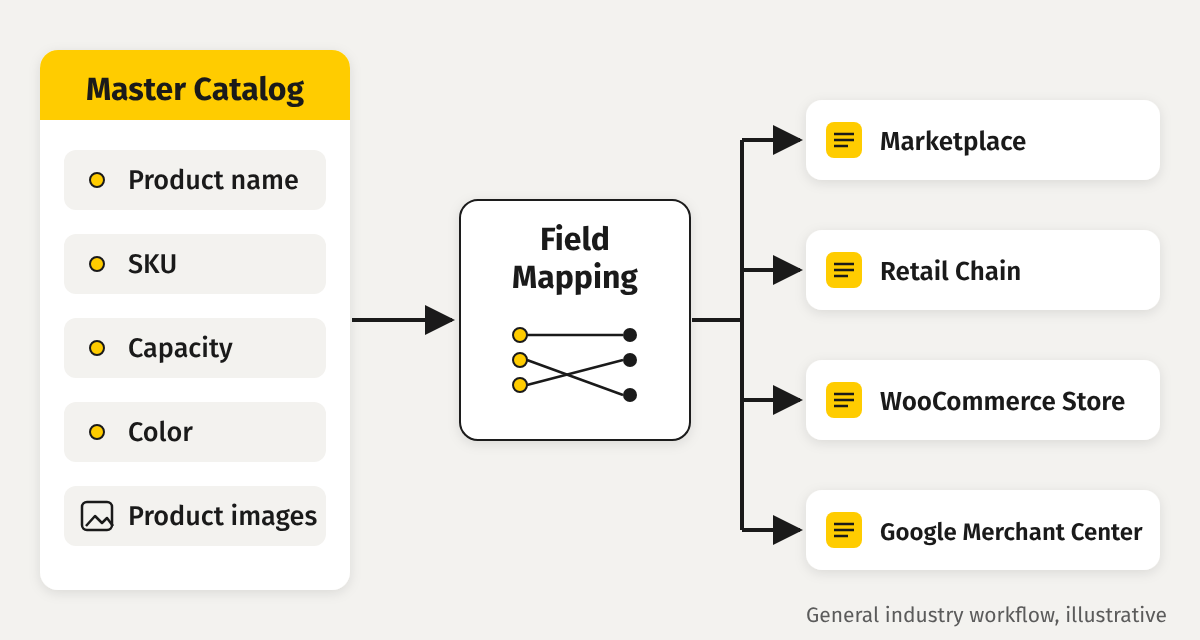
The idea is to keep the information about a product in one place and prepare it for the different places where the product is sold. That may mean changing a column name, shortening a description, choosing a different image, or rearranging the product and variant rows in a file.
The information itself should stay accurate. A 750 ml bottle does not become a 500 ml bottle because a retailer calls the volume field something else. But one recipient might expect 750 and ml in separate columns, while another expects 750 ml in a single field.
Ecommerce data syndication becomes particularly useful when the same assortment goes to several recipients. You maintain the underlying facts once, rather than treating every sales channel as a separate catalog. The channel versions can still have their own copy and images.
Product Data Syndication Examples
Take a navy 750 ml insulated bottle with the SKU WB750-NV. Its master record contains a product name, capacity, color, price, and photos. The table shows how the same record might be represented for four recipients. The column names are illustrative, not official templates.
| Recipient | Example of how the record changes |
|---|---|
| Marketplace | Title: Insulated Water Bottle, Navy, 750 ml; SKU: WB750-NV. |
| Retail chain | Item No.: WB750-NV; Colorway: Navy; Capacity: 750 ml. |
| WooCommerce store | Parent: WB750; variation SKU: WB750-NV; color: Navy. |
| Google Merchant Center | ID: WB750-NV; title: Insulated Water Bottle; price and image link in separate fields. |
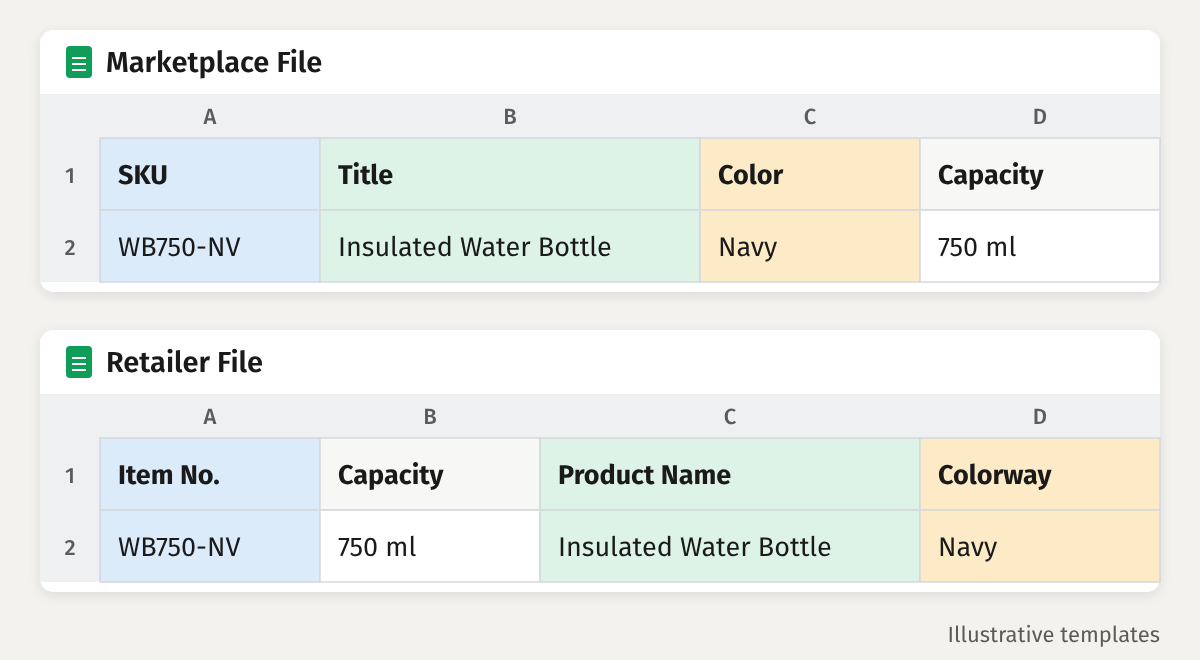
Even two buyers selling the same bottle can ask for different column names, a different order, or a different way of grouping colors. A field labeled Capacity may contain a number in one file and a number plus a unit in another.
Marketplace product syndication works on the same principle. The catalog supplies the facts, while the destination determines how they need to be presented. There is no single file format or row structure that works everywhere.
How Product Data Syndication Works
Most workflows come down to three things: keeping a reliable catalog, matching its fields to the destination, and delivering the result. The last step gets most of the attention, but the first two often take more work.
One Source of Truth
Start with a master catalog. Some teams keep it in a spreadsheet; others use product information management (PIM) to store and enrich product records, attributes, and media. If you are unfamiliar with the term, here is a guide to what a PIM is.
Suppose the supplier corrects the bottle’s weight from 420 g to 380 g. You fix the master record first, then bring that correction into the relevant channel versions and send the updated information. Without a master record, you have to remember every spreadsheet where the old value might still exist.
This is where product content management comes in, too. Someone needs to own the product facts, descriptions, and approved images before they are distributed.
Mapping Data to Each Channel
Field mapping tells you which piece of information from your catalog belongs in which field at the destination. SKU might become Item No. in one spreadsheet and Product ID in another. The mapping should identify the source field, not just the column position, so a reordered template does not silently put the wrong values in the wrong columns.
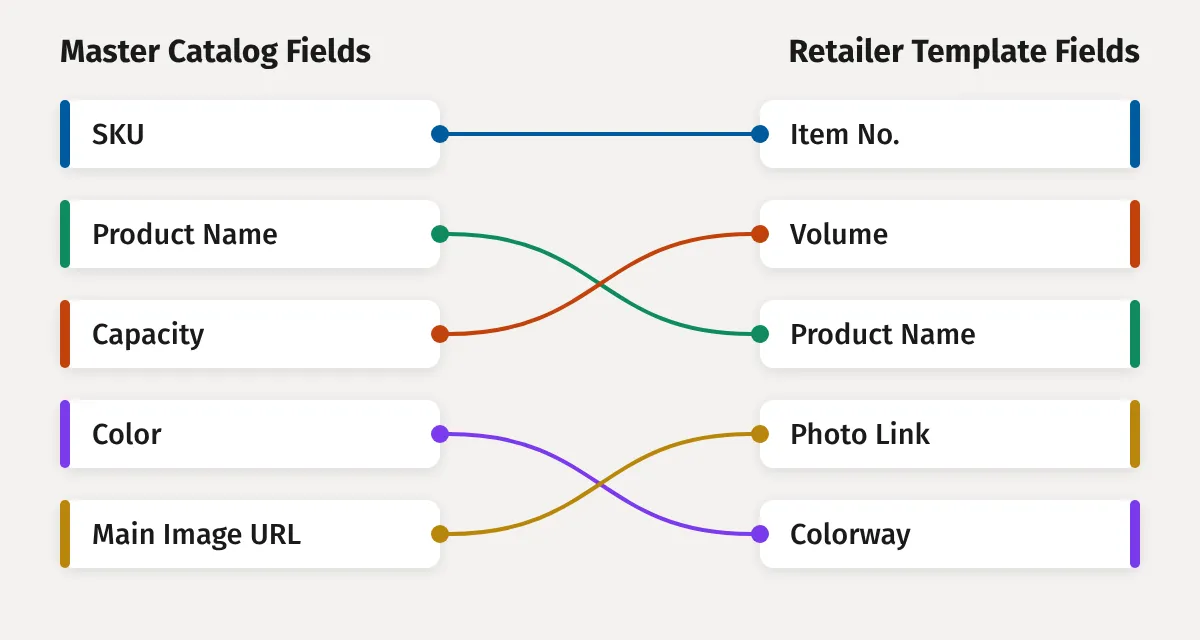
Other fields need more attention. A recipient may expect a price and its currency in separate columns, or a weight and its unit in one field. You need to check which representation it asks for before preparing the data.
Variants are another part of the mapping. A bottle family (WB750) may have two color SKUs (WB750-NV and WB750-BK). One partner may want a parent row followed by two variant rows. Another may expect two complete SKU rows, each repeating the shared product name and capacity. The records describe the same assortment, but the row structures are different.
Delivering the Data Through APIs, Feeds, and Files
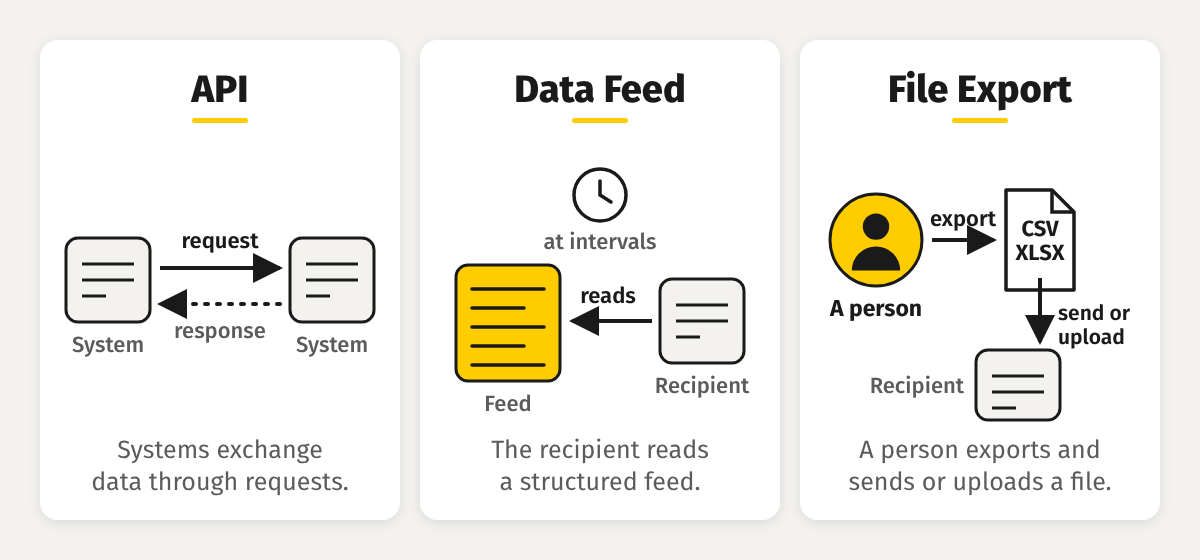
Once the data is ready, it needs to reach the recipient. There are three common ways to do that.
| Method | How updates reach the recipient | What needs to be maintained |
|---|---|---|
| API | A connected system sends or requests changes, depending on the connection. | Authentication, field mapping, and the connection itself. |
| Data feed | The recipient reads a file or feed at intervals. | Feed structure, access, and refresh frequency. |
| File export | Someone generates and sends or uploads a new file when needed. | The recipient’s template, mapping, and delivery record. |
Some retail partners use supplier portals, while others exchange standardized data through networks such as the Global Data Synchronization Network (GDSN).
Which method makes sense depends on the recipient and how often the information changes. An API may suit frequent updates. A feed may suit a destination that reads a structured catalog at intervals. A spreadsheet can be adequate for a buyer who requests a catalog twice a season. In every case, agree on who checks the data and how corrections are delivered.
Syndication vs Feed Management vs PIM
These terms tend to appear together, which makes it easy to confuse them. They describe different parts of the same job.
- PIM is where you maintain and enrich product information. It is the home of the catalog.
- Syndication is the process of preparing and distributing that information to the places that need it.
- Feed management is a part of that process focused on preparing and maintaining feeds for destinations such as shopping ads and marketplaces.
A business can syndicate to several destinations without a feed for each one. The retailer that asks for an Excel file is still a recipient, even though its workflow has no feed at all.
Why It Matters for Brands and Suppliers
The benefits become easier to see once your catalog goes beyond your own storefront.
- Faster launches. When the partner’s format is already worked out, the next collection takes less time to prepare.
- Fewer avoidable rejections. Matching the required columns and checking the data before delivery can reduce the number of files returned for corrections.
- More consistent product information. Every recipient starts with the same product facts, even if the titles and images differ.
- Less spreadsheet work. Your team spends less time rebuilding files and more time improving the actual catalog.
Consistent information also supports a wider digital shelf strategy: shoppers should be able to trust the specifications they see wherever they encounter the product. If your team is already struggling to keep several spreadsheets current, our guide to PIM vs. Excel explains where a centralized catalog starts to make sense.
Common Syndication Challenges
Getting the first file out is one thing. Keeping the process working over the next few seasons is another. Here is where teams tend to run into trouble.
- Templates change. A retailer adds a mandatory attribute or renames a column, and the file that worked last month needs another round of edits.
- Variants do not line up. Parent SKUs, individual variants, and record types may be represented differently from one recipient to the next.
- Images are hard to access. A photo link may require a login, or a separate folder of images may leave the buyer guessing which file belongs to which SKU.
- Channel-specific content gets overwritten. A title written for one retailer ends up in another retailer’s file because both were edited in the same spreadsheet.
- Updates are easy to miss. When a price or assortment changes, someone needs to know which recipients need a fresh file and which version was last sent.
None of these issues disappears simply because the catalog is centralized. You still need to maintain the mapping and check the output against the recipient’s current requirements.
How to Syndicate Product Data Without an Integration
Imagine that one of your retail partners sends you an Excel template every season. There is no API available to your team, or the cost of building a connection makes little sense for a few catalog updates a year. You still need a reliable way to prepare that file.
A repeatable catalog syndication workflow looks like this:
- Maintain the core product information in your master catalog.
- Create a separate version of the assortment for the partner, with the content it needs.
- Save the partner’s file template and match your catalog fields to its columns.
- Bring relevant catalog changes into the partner’s version, check the data, and export a fresh file using the saved mapping.
- Send or upload the file to the recipient and record which version you delivered.
Toriut handles this kind of workflow through Manual Channels. You can create a channel for a retail partner or marketplace, keep its own product versions, and configure an Export Profile to reuse the required column names, order, and row structure. The result can be exported as a CSV or XLSX file, with public image links alongside the corresponding SKUs.
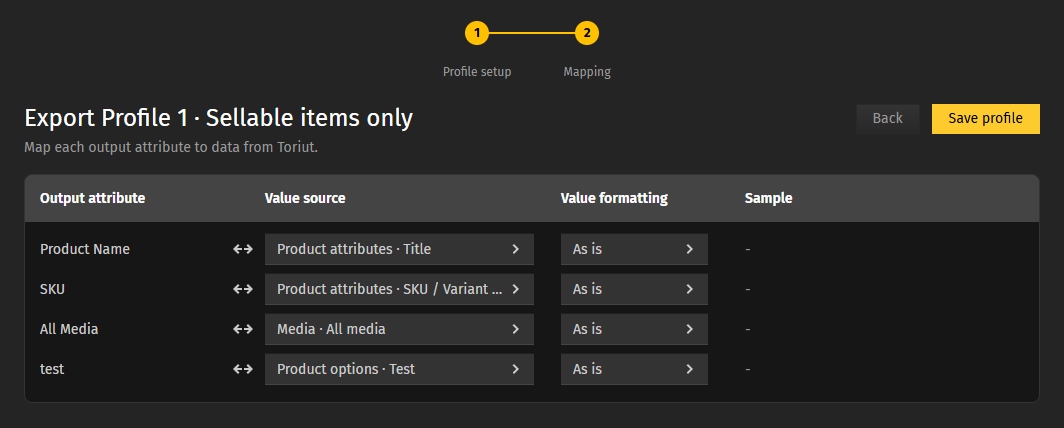
Connected Shopify stores can receive data through the Shopify API. For a partner that takes files, the workflow is different: you bring the relevant changes from Master into the channel using Sync to channel, review the channel version, and export it. Your team then sends or uploads the file manually.
The useful distinction is between preparing the file and delivering it. A saved mapping makes preparation repeatable, but it does not verify that a buyer has accepted the file. If the partner changes its requirements, adjust the export profile and check a sample before generating the next full export.
Tips for Getting Syndication Right
You do not need to overhaul your entire catalog to make the next delivery easier. Start with the parts of the workflow that cause the most rework.
- Clean up the master catalog. Fill in the required attributes, use consistent units, and check that every variant has the right SKU and images.
- Save the current template and mapping for every partner. Keep them together so the next person preparing the file knows which rules to follow.
- Test with one product first. Choose one with several variants, export it, and check the columns and row structure before preparing the full assortment.
- Open image links in a private browser window. If they require a login, the recipient may not be able to access them either.
- Keep partner-specific content separate. Record what you sent, to whom, and when, especially when several people prepare catalog updates.
- When choosing a PIM, check whether it supports separate channel versions and reusable export templates. If Shopify is your main storefront, our comparison of PIM systems for Shopify is a useful starting point.
Final Thoughts
For many suppliers, sending product information to partners is less about connecting every system and more about preparing the same reliable data in different formats, again and again. An API is one way to deliver it. A well-maintained file can be another.
If you want to see how one catalog can support your Shopify stores and file-based deliveries to retail partners, book a demo.
Frequently asked questions
What does data syndication mean?
It means distributing data from one source to multiple recipients in a form they can use. In ecommerce, the data usually describes products and goes to sales channels or retail partners.
What are examples of syndicated data?
In market research, syndicated data can mean research collected by a provider and sold to multiple clients. In ecommerce, it can mean product descriptions, specifications, prices, and images distributed from a brand’s catalog to its sales partners.
What is content syndication?
In marketing, it means republishing content such as articles on other websites to reach a wider audience. When the content is about products, it means distributing product information to the places where those products are sold.
What are some examples of product data?
Product names, SKUs, descriptions, prices, dimensions, materials, colors, and images are all examples. The exact attributes depend on what the product is and which recipient needs the information.
What is the difference between a data feed and an API?
A feed provides a structured set of data that a recipient can read, often at regular intervals. An API lets connected systems exchange data through requests; how often and in which direction depends on the connection.
Do I need a PIM for product data syndication?
No. A small catalog with a few recipients can be managed in spreadsheets. A PIM becomes useful when the catalog grows, several people edit it, or different channels need their own versions of the same products.
Can I syndicate product data with spreadsheets?
Yes. You can maintain a master spreadsheet and prepare separate files for each recipient. Saved templates and mapping rules help make the process repeatable, but you still need to check and deliver each updated file.