


In this article, you'll learn:
I've run something like a hundred demos. Founders with a single store, people just getting their feet wet in e-com, agencies, catalog managers off Upwork. But one call stuck with me — because he walked through it point by point, calmly, exactly why our product wasn't a fit for him at the time. And he was right.
I'm going to tell this one straight. No "well, we've got a button that fixes everything." Because there's no magic "make money" button — and if you're reading this and recognizing yourself, you already know that.
Who he was
Not a beginner dropshipper. Not a guy with one "dream store" on Shopify. An operator.
Here are the numbers he rattled off in the first five minutes:
- 14 Shopify stores — one per country: Germany, the Netherlands, the UK, and down the list.
- ~1,000 orders a day.
- 2,000–3,000 active products at any given time.
- up to 50 new products a day.
- a team of ~30: listing on its own, customer support on its own, media buying, research, supply chain — all separate.
- ~90% of ad spend in Google Shopping.
- and the kicker: he also runs his own Google Ads agency, with clients who have the exact same problem.
Same catalog across the board. Different local brands. Different languages. The products are mostly shared — sourced from Chinese suppliers, with the content rewritten for each market.
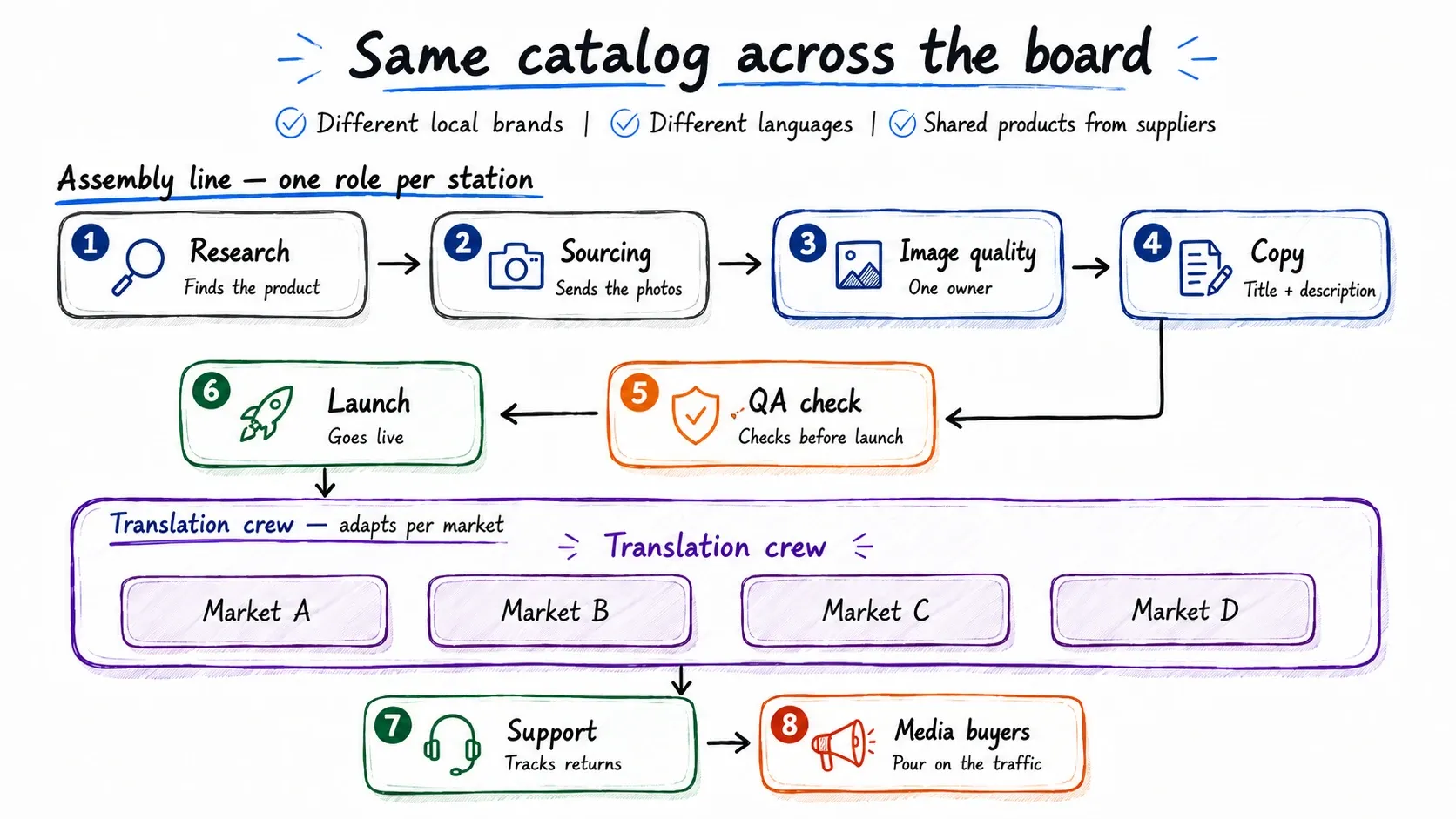
This isn't "a person running a store." It's a factory. With an assembly line of roles: research finds the product → sourcing sends the photos → one person owns image quality → another owns the title and description → a third checks it before launch → a translation crew adapts it per market → support tracks returns → media buyers pour on the traffic.
Learn a smarter approach to running multiple dropshipping stores.
What his actual pain was (and why it's not "we need another product importer")
He summed up his problem in one line, and I wrote it down almost word for word:
Build and vet a product once, prep the local versions, and manage its status across every store from one place — no manual copying, no drift, and no risk of missing one of the stores.
Here's what that looked like for him day to day.
A new product. The team finds it → gets the photos → creates a unique title, description, images → manually builds it in one Shopify store → exports it → loads it into the rest → adds the translation by hand in each one → checks it before going live. At 50 new products a day, that's not work. That's endless copy-paste across 14 admin panels.
A product needs to come down. Out of stock at the supplier. Or returns are piling up. Or it's non-compliant. Or it's just not selling. So someone goes into every store by hand and flips it to Draft. The killer: you switch it off in Store 1 and forget Store 5. And it keeps running — burning ad budget and generating orders you can't fulfill.
All the operational info lives in spreadsheets. SKU, stock, return reasons, quality, the supplier's real photos, "keep selling or kill it," team notes. The spreadsheet can't hold the volume anymore, and it gives you zero accountability — no one knows who made a call, or why.
The team shares one Shopify account. No roles, no idea who changed what, no quality control.
And here's the thing he said that flipped a switch for us:
My advertising scales faster than my operations do.
He knows how to push spend in Google. He knows how to open new markets. His bottleneck isn't finding buyers. His bottleneck is whether the back office can safely keep up with that growth. Every new product and every new market adds manual load, one for one. And every sloppy listing is a risk of a Google Merchant Center disapproval — and, worst case, a store suspension. So for him, catalog quality isn't about being tidy. It's about whether the ad channel his entire revenue rides on is still standing tomorrow.
What I could offer him then — and why I told him "not yet," honestly
Back then, Toriut was basically a layer on top of Shopify. A nice one. Good DAM, solid search, portals. But:
- you couldn't connect multiple Shopify stores;
- there was no single master record for a product to spin store versions off of;
- you couldn't build a product once and push it out to 5, 10, 14 stores;
- you couldn't switch a product off across every selected store from one place.
That was the dealbreaker. I could've offered to clean up his media and get his team into a shared workspace — useful, but it didn't solve his core problem. So I said exactly that. He nodded, thanked me for being straight with him, and left.
And we went off to rebuild the product. Not because of him alone — but he was the drop that set the priorities.
What we changed
Here's the mechanics, in plain terms.
1. The master catalog lives separately from the stores
Toriut used to mirror Shopify: whatever was in Shopify was in Toriut, and vice versa. Now it's the other way around. Toriut is the single source of truth. The product list in it is your master records. They live in Toriut — not inside one of your stores.
Why this matters for you specifically: right now you've got 14 independent catalogs pretending to be one. There's no record the versions are born from. There are 14 copies quietly drifting apart. The master catalog kills that: one record per product — and the reference point for everything else.
2. Channels = layers on top of the master
Every product gets tabs in the interface: Master, Shopify DE, Shopify NL, Shopify UK — one tab per connected store.
Inside a single product, the price on the master is €150; in Shopify DE the description is in German with its own price; in another market's Shopify it's a different currency and different copy. One product, as many channel versions as you want, each with its own attribute values wherever the market calls for it. Edit the shared stuff — you edit the master. Need something different for a specific store — you edit that store's layer. Not 14 copies. One product with 14 faces.
3. One product → pick your stores → publish in one click
This is the whole reason we did this.
You create the product in the master catalog (by hand or via import — more on that below). You prep what you need. You hit publish — and the system asks: "This product also exists in 10 other stores. Publish there too?" Yes, I do. Done.
Instead of "open 14 admin panels and rebuild the product by hand in each," it's: pick your stores, click. Same with taking something down: find the product, pick the stores, change the status — it applies everywhere. No more "switched it off in Store 1, forgot Store 5."
4. Drafts, and launching on your schedule
Every channel version has two states: draft and published. You prep the draft ahead of time — fill in everything you need, and it can sit in Toriut for a month. Launch day comes — you publish to the stores you want in one click. None of that "somebody saved it in the Shopify admin and it went live too early."
5. CSV import for anyone whose supplier throws Excel files at them
Specifically for those of you whose supply chain runs on files (which is almost everyone). We've got a five-step import wizard. It does what you'd expect:
- a preview of the columns and rows from your file;
- three strategies: add only (create new products only), update only (update existing ones only), add + update (both);
- variant detection — if your file has "polo red M, red L, blue S..." the system groups them under one product;
- mapping auto-suggest: it looks at your column names and tries to match them to Toriut fields on its own; anything missing, it creates with an Add missing fields button;
- there's a sample CSV — download the ready-made template, upload it, see how it works, without exposing any of your real data.
Supplier sends 100 new items → you upload the file → you distribute them to the stores you want. Not two days. A couple of clicks.
6. Variants without the Shopify headache
Shopify caps how many options and variant combinations a product can have. If your product has hundreds of variations and a given store only needs some of them — you keep the full variant structure in the master and publish only the subset that store needs. You've got the complete picture; the storefront gets exactly what that market calls for.
7. A built-in DAM — the thing sync apps don't have
This is where we're fundamentally different. Toriut runs on the Pics.io engine — a real DAM, not a "folder of pictures." Media lives right next to your products and variants: versions, tags, search, rule-based bulk matching of images to products, renditions (resize, crop, format conversion per channel).
For your listing team, that means the source files, the versions, and "which image is the current one" stop being a mess of Dropbox files renamed 10 times over. Sync apps won't give you this — they shuttle data between stores, but they've got no single source of truth and no media engine.
8. Roles and team
Bring everyone in — listing, content, translators, QA, support — into one workspace with access permissions. Store A is handled by one team, Store B by another, Store C by a freelance catalog manager. Everyone sees their own slice. Goodbye to the shared Shopify account where no one knows who touched what.
The learning curve: also straight with you
A PIM isn't a "log in, press two buttons, get results" thing. Nobody on the market is that. The initial attribute-schema setup, the mapping, the import — you'll have to work through it once. We cut the friction where we can: mapping auto-suggestions, a "create the missing fields" button, sample data, and the option to get in and poke around without connecting a live store (afraid of breaking your production store? don't connect it — jump in on sample data). But if you want 14 stores to see 100 new products in a single click, you'll have to get to know how the system works. An hour up front pays for itself in the weeks you're currently losing to copy-paste.
Why I told you all this
That guy with 14 stores wasn't describing "I need a PIM." He was describing a situation where growth in advertising outpaces the team's ability to run the catalog. And the answer here isn't "one more tool for your data" — it's the ability to scale sales across a pile of stores without scaling the manual work.
If I had to boil down what Toriut is for you, it's three lines:
Build the product once. Localize it per market. Keep every store consistent.
If you recognized yourself in this story — get in and click around on sample data, no live store required. And if you'd rather talk to a real person first and ask all the awkward questions (including "what don't you have yet") — book a demo. I'll give it to you straight. Same as I did that guy.