



In this article, you’ll learn:
A supplier sends you a spreadsheet with new T-shirts. The photos arrive in a separate folder, and your WooCommerce store still has last season's descriptions. Before anyone can publish the new collection, someone has to put all those pieces together. If that sounds familiar, this guide will help you decide whether the store's own tools are enough or whether you need a central catalog.
What Is WooCommerce Product Information Management
WooCommerce product information management is the process of collecting, organizing, updating, and maintaining the data that describes products sold through a WooCommerce store. A Product Information Management (PIM) system gives ecommerce teams a central place to maintain that information before sending it to their stores and other sales channels.
What counts as product information? Take a cotton T-shirt. The name and description tell shoppers what it is. The size, color, SKU, price, and images tell them which version they are buying. Categories help them find it. All of these pieces of information make up the product record, even if they come from different people.
In a small store, most of that information can live in the product editor. As the assortment grows, some of it tends to move elsewhere. A supplier sends specifications in Excel, a photographer uploads images to a shared folder, and the person running the store keeps a spreadsheet with the latest prices. The store shows the result, but it is no longer the only place where the data lives.

That distinction matters when you decide how to manage WooCommerce products. Are you trying to edit the information already in your store, or do you need a better way to maintain the information before it gets there?
What WooCommerce Handles on Its Own
WooCommerce already has a product editor and a built-in CSV importer and exporter. You can export products, make changes in a spreadsheet, and import the file again to update existing records. The importer can match products by ID or SKU, so importing a file does not necessarily mean creating a new set of products.
The store also supports variable products. A T-shirt, for example, can have size and color attributes, with individual variations that carry their own SKU, price, image, and other details. You can manage those variations in the product editor without introducing another system.
For a shop with a straightforward assortment and one person looking after the data, that may be all you need. If the task is changing the price of a group of products before a weekend sale, a separate catalog system might add more work than it saves.
The harder question is where the data comes from. If a supplier sends a new size chart while another person is updating descriptions and someone else is replacing photos, the store editor cannot tell the team which external file is current. The problem is not the number of products WooCommerce can hold. It is the number of places where people maintain the information that goes into those products.
Signs Your Product Data Has Outgrown Spreadsheets
There is no particular catalog size at which a spreadsheet stops being useful. Look instead at what happens during an ordinary product update.
- Variations need fixing after import. A new color arrives in a supplier file, but the parent product and its variation rows no longer match. Someone has to reconstruct the relationship before the file can be used.
- Photos and product records live apart. The spreadsheet says the shirt is navy, but the image folder contains several nearly identical filenames. Finding the approved photo for that SKU becomes a separate task.
- People work from different versions. The buyer updates the material in one copy while marketing revises the description in another. When the files are combined, it is easy to bring an old value back into the catalog.
A spreadsheet can still be part of the workflow. What becomes difficult is treating several spreadsheets as the authority on the same product. Our guide to PIM vs. Excel goes into more detail about when that arrangement stops working.

CSV Import, Plugins and PIM Compared
These approaches address different parts of WooCommerce product data management. A CSV import moves data into the store. A bulk-editing plugin makes changes to records in the store easier. A PIM gives the team a place to maintain those records outside the store.
| Built-in CSV import | Bulk-editing plugins | PIM | |
|---|---|---|---|
| Source catalog | Store or external spreadsheet | Existing store records | Central catalog outside the store |
| Variations | Prepared in the CSV | Edited in the store, depending on the plugin | Managed with parent and variant records |
| Images | Image references in the file | Existing store media or supported image fields | Product data and associated media, depending on the system |
| Several channels | Separate files prepared as needed | Usually focused on the store being edited | Channel-specific data from a shared catalog, where supported |
Suppose the store needs to change the price of every navy shirt. If the current records are correct, a bulk edit may be the simplest answer. If the team has also received new descriptions, supplier specifications and images for the next collection, the job is different: someone needs to assemble and maintain the new product information before it reaches the store.
The methods can work together. A team might keep its catalog in a PIM, use CSV to deliver it, and still use the store editor for a one-off correction. Bulk-editing plugins speed up changes in the store; a PIM addresses where the source information is maintained.
What a PIM Does for a WooCommerce Store
The point of a central catalog is to make the next update easier, not just to move the existing spreadsheet somewhere else. Three parts of the workflow are worth looking at.
One Source of Truth for Product Data
Imagine the supplier corrects the fabric composition of a T-shirt from 95% cotton to 100% cotton. The team fixes the shared product record first, then uses that record to prepare the affected channel updates, rather than correcting every spreadsheet independently. For a closer look at how central catalogs work, see our guide to what a PIM is.

Variations and Images in One Place
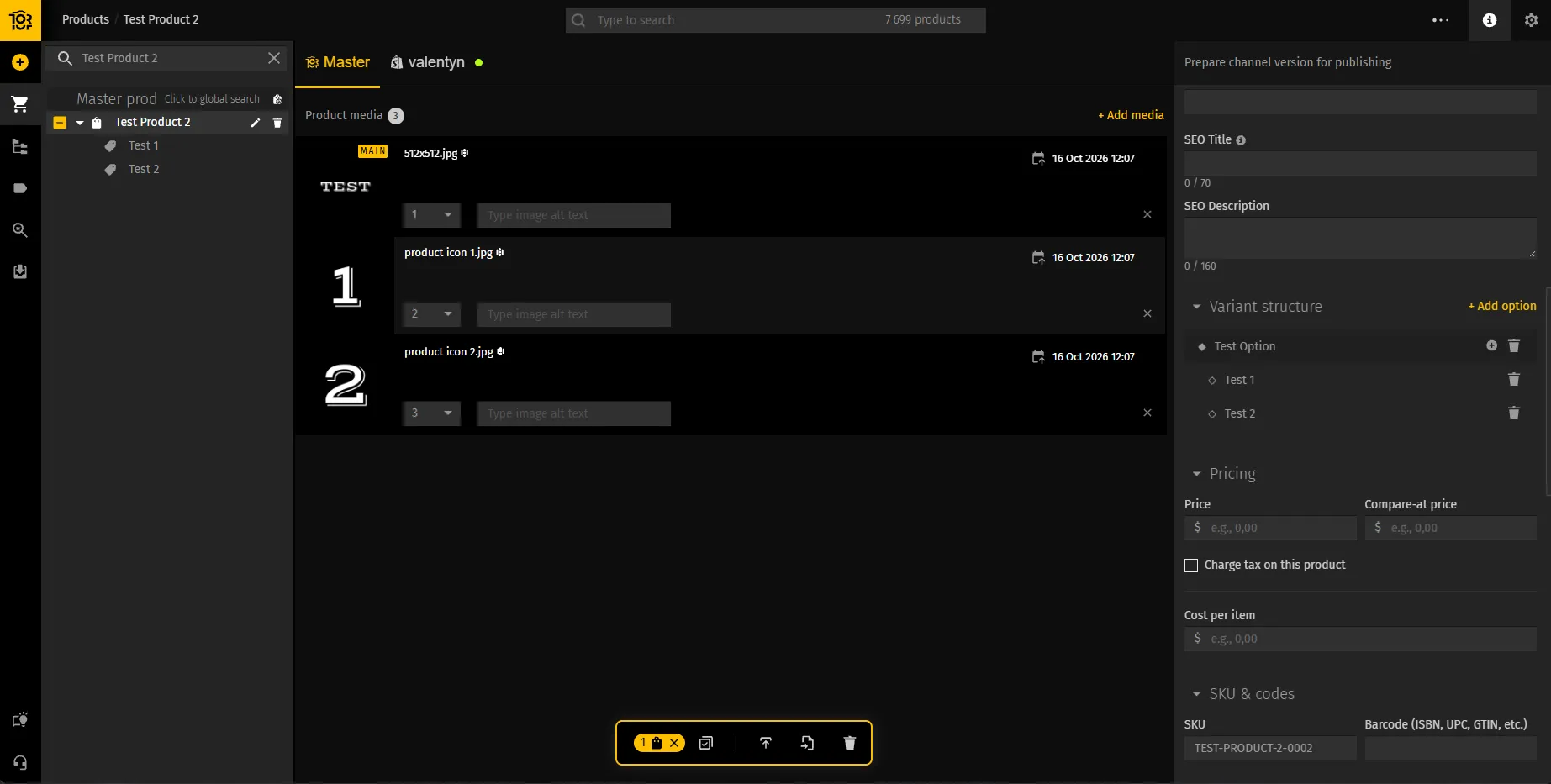
In Toriut, a T-shirt starts as a master product. In the Variant structure section of its details panel, you add options such as Size or Color and give each one its values, for example S and M. The resulting variants appear under the master product in the product list, so the link between parent and variants is visible before anything is exported. Product media stays with the product record, which means the person preparing the next release can check its images there instead of searching a separate folder.
A Separate Version for Each Channel
Your own store may need a detailed description, while a retail partner asks for a short name and a particular set of attributes. A PIM that supports channel-specific versions lets the team maintain those differences from one source catalog without making a full independent copy of the assortment for every recipient.
How to Choose a PIM for Your Store
Start with a product that causes your team trouble. A simple product with one image and no variations tells you very little about whether a new system will fit your WooCommerce product catalog. Take a variable product from a real supplier file and see how the following five things work.
- How the data reaches the store. Some systems use a connector, while others prepare a file for the store's importer. Ask who maintains the connection or export template, how changes are delivered, and what happens when someone edits a product directly in WooCommerce. Choose a method that fits the way your team works.
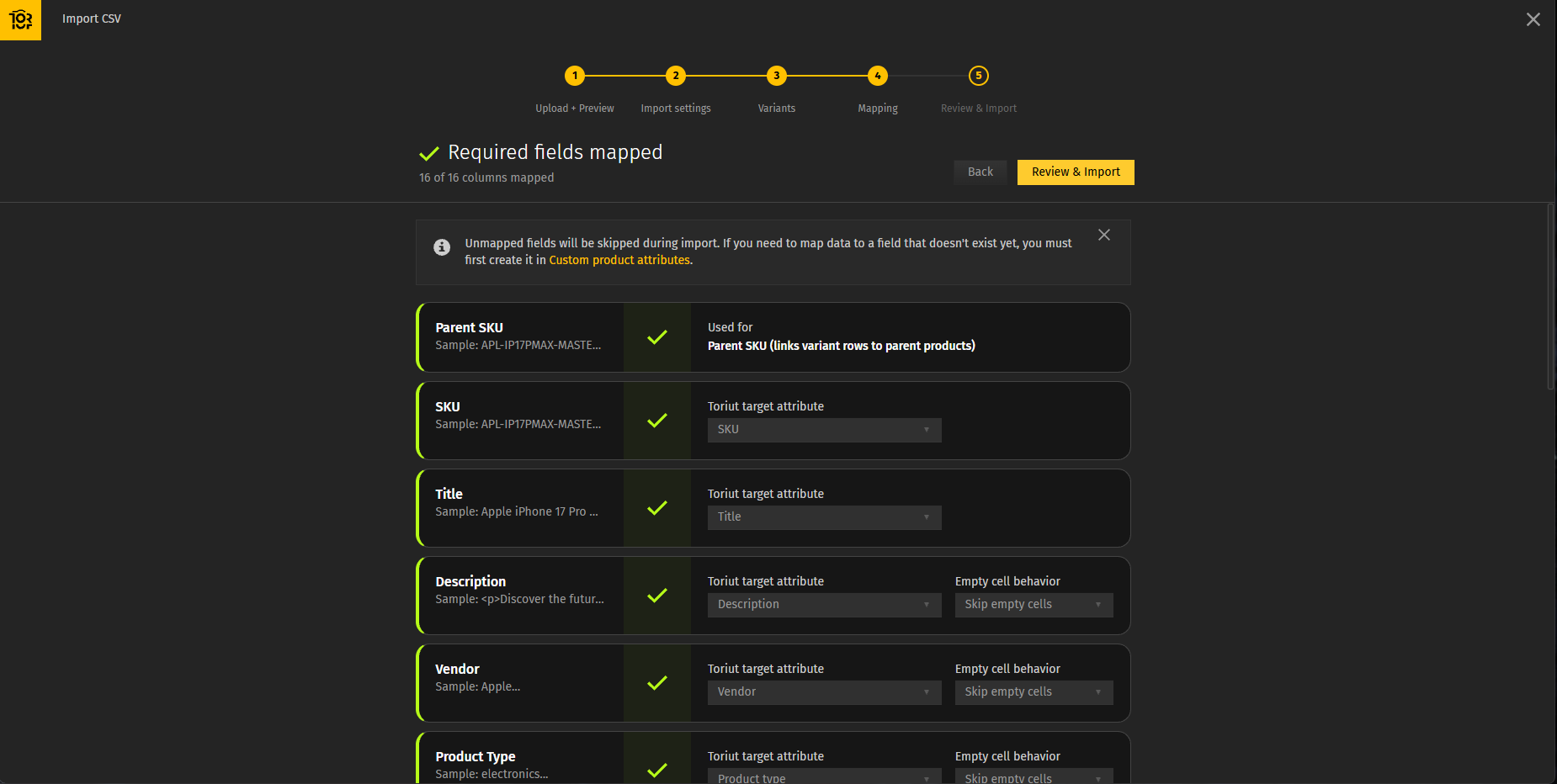
- Variations and attributes. Check whether you can keep a parent product and its size and color variations together. Ask to see how those records are represented in the output, including the identifiers that link variations to the parent. A clean-looking catalog is not enough if the exported rows do not fit your import process. Toriut's own CSV import, for example, uses Parent SKU and Toriut Parent Record ID columns to link variant rows to their parent products.
- Product media. Find out whether images live alongside the product information or in a separate library. Try assigning a different photo to two color variations, then check whether the exported data identifies the right image for each SKU. If the file contains image URLs, check that they can be opened by the recipient.
- Roles and access. Think about who actually maintains each field. A buyer might own specifications, marketing might own descriptions, and another person might approve images. Check whether the available access controls fit those responsibilities rather than assuming everyone needs permission to change everything.
- Catalog growth and additional channels. If you expect to sell through another storefront or send files to retail partners, find out how the system handles different versions of the same product. Ask whether you can reuse shared attributes and keep recipient-specific content separate. Test a second destination, not just a single store.
You do not need to choose a system based on the longest feature list. If Shopify is also part of your business, our comparison of PIM systems for Shopify shows the kinds of catalog and channel questions worth asking. For a store that uses files, pay particular attention to how the export is prepared and checked.
Managing WooCommerce Product Information With Toriut
Toriut is a PIM with built-in digital asset management (DAM), where you maintain product data and media together. Its PIM for WooCommerce workflow prepares a CSV for the standard WooCommerce product importer.
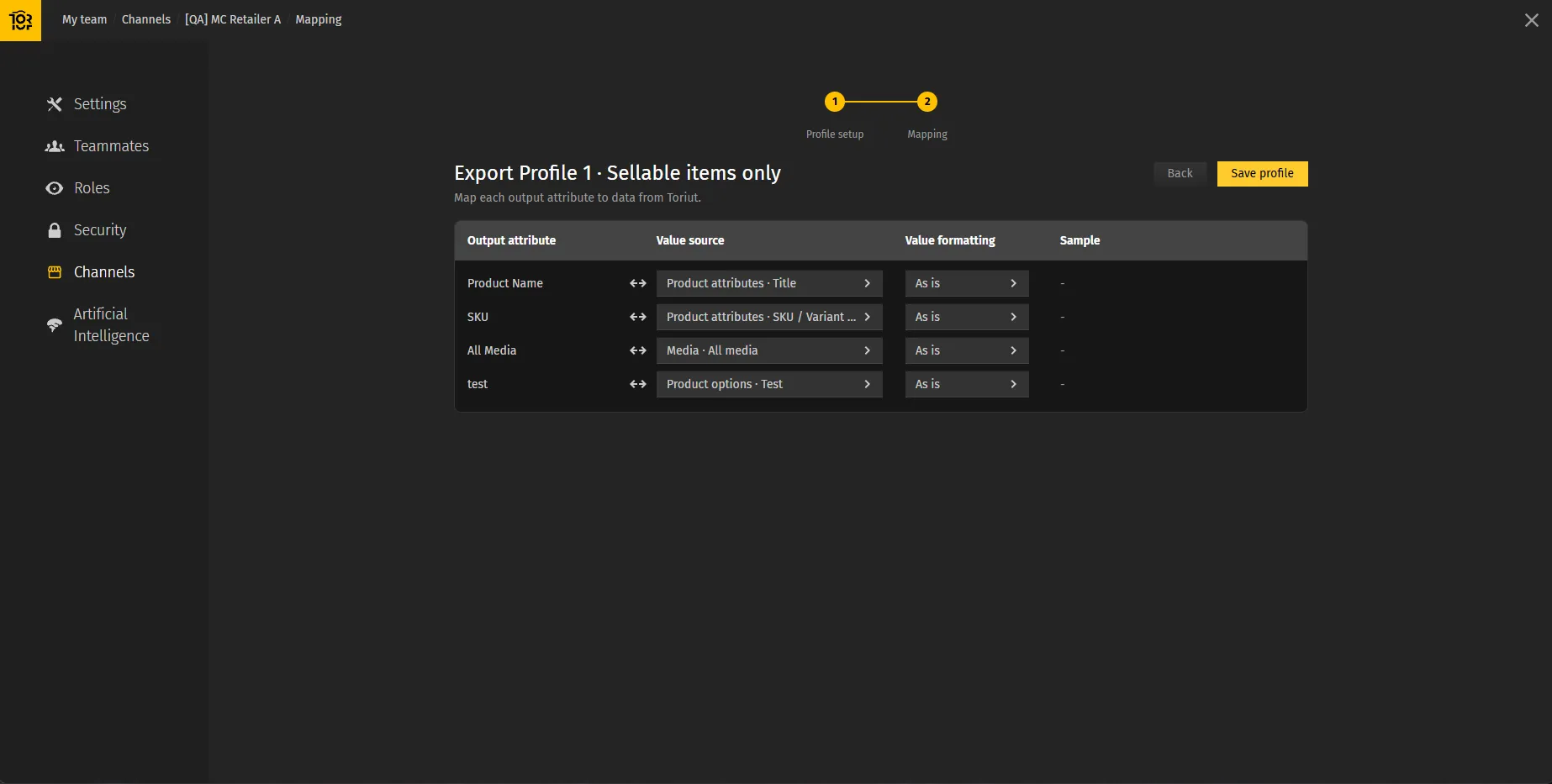
With Manual Channels, you create a channel for the store and configure an export profile by setting the columns yourself or uploading a template. Update the channel with your latest catalog changes before each export. You can reuse the saved profile for later files, which your team uploads to WooCommerce manually. Native WooCommerce integration is planned.
Frequently asked questions
What is a PIM for eCommerce?
It is a system for maintaining product information such as names, descriptions, specifications, variations, and media in a central catalog. That catalog provides a source of data for the stores and other channels where the products are sold.
Why use a PIM for a WooCommerce store?
It helps when the information used by your store is maintained in several places or by several people. A central catalog gives the team a common starting point for preparing product updates and makes it easier to maintain different versions for different recipients.
How does a PIM work?
The team collects and enriches product information in a central catalog, then prepares the fields and records required by each destination. Depending on the system and recipient, the data can be delivered through a connector or a file, among other methods.
Can I manage WooCommerce products with a spreadsheet?
Yes. A spreadsheet can work well for a small assortment with a clear owner, especially when used with the built-in CSV importer. It becomes harder to maintain when variations, media, several editors, or channel-specific versions need to be kept in order.
How can I bulk upload products to WooCommerce?
Prepare a CSV with the required product fields, then go to Products → All Products and select Import in your WooCommerce dashboard and match the columns to the store's fields. If you want to update existing products, use the update option and include the relevant IDs or SKUs; check a small sample before importing the full file.
Does WooCommerce have a built-in PIM?
WooCommerce has its own product management features, including attributes, variations, media, and CSV import and export. These help maintain the store's catalog, but they do not provide a separate central catalog for preparing and distributing product information across multiple recipients.
Final Thoughts
If your team spends more time reconciling product files than maintaining the actual products, try working from one catalog. To see how that approach fits your assortment, you can book a demo of Toriut.


