

In this article, you’ll learn:
AI is much easier to adopt in e-commerce than it was a few years ago. Search apps, recommendation engines, AI copy tools, support bots, feed optimization, and forecasting no longer feel experimental. What is still hard is getting real results from them.
Some AI use cases pay off quickly. Some work only when your catalog, tracking, and workflows are already in decent shape. And some still create more noise than value.
That is what this guide is about: where AI actually helps in e-commerce, where it disappoints, and which AI tools for ecommerce are worth prioritizing first.
In practice, artificial intelligence in ecommerce is most useful when it improves an existing workflow and helps customers to find what they want quickly.
How We Evaluated These Use Cases
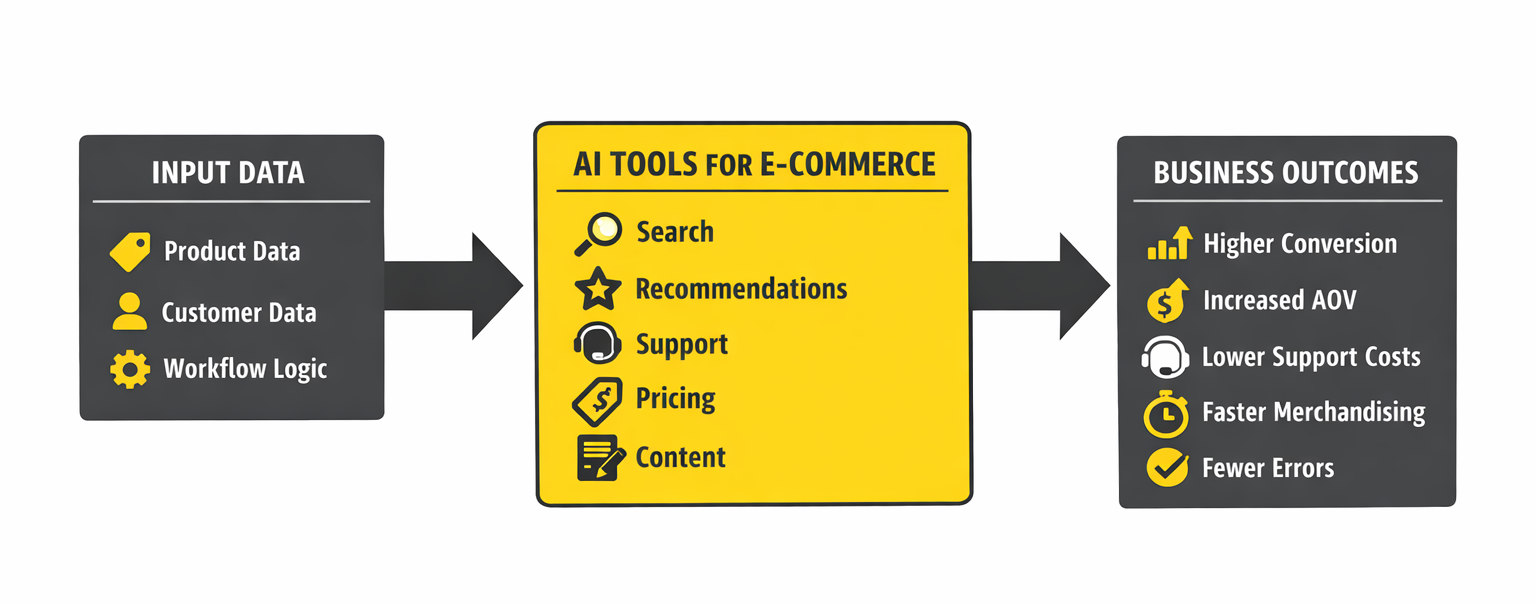
The market is full of ecommerce AI tools, but not all of them solve problems that matter commercially. This is not a list of the most impressive AI demos. It is a list of the use cases most likely to earn their place in a real e-commerce operation.
We looked at five things: how quickly a use case can affect revenue or efficiency, how hard it is to implement, how much clean data it needs, how easy it is to measure, and how much human oversight it still needs.
AI for Product Discovery and Search
Search is one of the highest-impact AI use cases in e-commerce because it affects visitors with strong purchase intent. Traditional keyword searches often break down when customers use language that does not match your catalog. Semantic search improves this by understanding intent rather than exact wording.
A shopper searching for “something warm to wear at home in winter” may still see slippers, blankets, and loungewear even if those exact words do not appear in the product titles.
Search quality matters because search users are usually closer to purchase than casual browsers. Better search does not just improve UX. It improves conversion from some of the most valuable traffic on your site.
Visual search is also useful, especially in categories where customers struggle to describe what they want. Fashion, furniture, and home décor are obvious examples. A customer may not know the right keywords, but they can still upload a photo and find similar products.
Where AI search usually breaks is not in the model. It breaks in the catalog. If titles are vague, descriptions are thin, and attributes are inconsistent, search has weak signals to work with. It may still beat plain keyword search, but not by much.
For AI search to work well, your catalog needs descriptive titles, useful natural-language descriptions, and consistent attributes such as color, material, size, and use case.
AI in Pricing: Dynamic Pricing and Margin Optimization
Dynamic pricing sounds smarter than it performs in some categories.
If you sell products people compare heavily on price, AI pricing can help. It is useful when competitor pricing is visible, demand is fairly predictable, and inventory pressure is real.
Clearance stock, commodity products, and highly competitive categories are the obvious fit.
It gets riskier when price is part of the brand signal. Premium products do not always benefit from constant adjustment. In some cases, moving prices too often makes the brand feel unstable rather than competitive.
The better question is not “Can AI help us sell more?” but “Can it help us keep more margin?” A lower-priced product with high return rates and expensive acquisition can easily be less profitable than a higher-priced one with steadier conversion and fewer downstream costs.
If pricing AI is worth testing in your category, margin data matters more than topline revenue alone.
AI for Customer Support: Automation With Boundaries
Customer support is one of the clearest areas for AI cost savings, but it is also one of the easiest places to create a bad customer experience.
AI is good at repetitive support work: order status, return initiation, shipping questions, and basic product details. These are predictable requests with clear answers.
The problems start when the situation is messy. Upset customers, edge cases, and context-heavy complaints still need judgment. In those moments, people want a resolution, not a longer exchange with a bot.
Personally, I would rather see a support bot escalate too early than sound polished while giving the wrong answer.
That is why the better setup is usually simple: let automation handle routine questions, and move anything complicated to a human early. When teams try to push every case through AI first, support starts feeling like a barrier instead of help.
LLM-based tools have improved how support systems understand natural-language questions. They have also made one failure mode more common: responses that sound confident but are still wrong. That is why escalation rules and review guardrails matter.
Support automation also matters because e-commerce still leaks revenue through friction. Baymard’s long-running checkout research puts average cart abandonment at about 70%, which means even small improvements in confidence, clarity, and issue resolution can have outsized commercial impact. AI will not fix checkout UX on its own, but it can reduce friction around product questions, delivery concerns, and return uncertainty.
AI for Inventory and Demand Forecasting
Forecasting is one of the most valuable AI use cases when inventory complexity is high. Too much stock ties up capital. Too little leads to stockouts, missed revenue, and avoidable customer loss.
AI forecasting improves on spreadsheet planning by pulling in more variables: historical sales, seasonality, promotions, lead times, stockouts, and external demand signals. That makes it more responsive when conditions shift.
It becomes useful once the business has enough history to model demand with confidence. If the catalog is still changing fast or sales history is thin, simpler forecasting often works better.
AI for Marketing: Email, Ads, and Content
Marketing has some of the best AI use cases and some of the most inflated promises.
In email, AI already works well for send-time optimization, subject line testing, segmentation support, and campaign drafting. These are practical, measurable, and easy to implement without requiring you to rebuild your workflow.
In paid advertising, AI is now built into major platforms. Performance Max and Advantage+ automate parts of targeting, bidding, and creative delivery. They can work well, especially when the product feed is strong. They can also spend inefficiently when the feed is weak.
In paid advertising, AI can work well, but it still depends heavily on feed quality.
AI-generated marketing content is useful as a production accelerator. It helps with outlines, drafts, ad variants, email copy, and short-form social content. It does not replace strategy, positioning, judgment, or fact-checking. The strongest teams use it to move faster, not to hand over decision-making.
AI-Generated Product Content
Product content is one of the most practical AI use cases for large catalogs. AI can draft product descriptions, improve titles, extract attributes from unstructured supplier data, and support translation workflows at scale.
That creates real leverage for teams managing thousands of SKUs. What used to take months of manual writing can now become a faster review workflow.
Review still matters. AI can generate plausible but incorrect specifications, drift from brand voice, or create risky claims in regulated categories. The workflow that works is still structured input, AI draft, human review, then publication. Speed helps. Unchecked speed does not.
Why AI Fails Without Clean Product Information
Most e-commerce AI projects do not fail because the tool is bad. They fail because the underlying product information is incomplete, inconsistent, or spread across too many systems.
A customer searches for a waterproof hiking jacket, but some products say “waterproof,” others say “water-resistant,” others list a technical spec, and some say nothing at all. Search misses relevant products.
A recommendation engine tries to suggest similar running shoes, but your catalog splits them across multiple category names. The results feel random.
Performance runs against a feed built on vague titles like “Blue Jacket” or “Running Shoe Model 4.” The automation has little idea who the product is for or what search intent it matches.
AI scales what is already there. If the data is strong, outcomes improve fast. If the data is weak, the automation simply spreads the weakness further.
The challenge is that many e-commerce businesses manage product data across the store platform, spreadsheets, supplier files, ERP systems, and channel feeds. Once the same product exists in multiple versions, AI tools start working from conflicting inputs.
That is where Product Information Management systems matter. A PIM gives teams one place to manage, standardize, and distribute channel-ready versions of product data everywhere else. That makes every downstream AI tool more reliable.
Same AI Tool, Different Outcome
Two apparel stores can install the same AI search app and walk away with completely different impressions of it.
In one store, the catalog is in decent shape. Product titles are clear. Attributes are standardized. Descriptions actually say something useful about material, fit, or use case. So when someone searches for “waterproof jacket for weekend hiking,” the results mostly make sense. The right products show up, filters help, and related items feel relevant.
In the other store, the app is the same, but the catalog is messy. Some jackets are labeled waterproof, some say water-resistant, some hide the information in a technical spec, and some do not mention it at all. Titles are vague, and categories overlap. Descriptions give you almost nothing beyond color and size.
At that point, the problem feels like inconsistent search. From the customer side, that means less trust, more friction, and more chances to leave.
Building Your AI Stack: What to Implement First
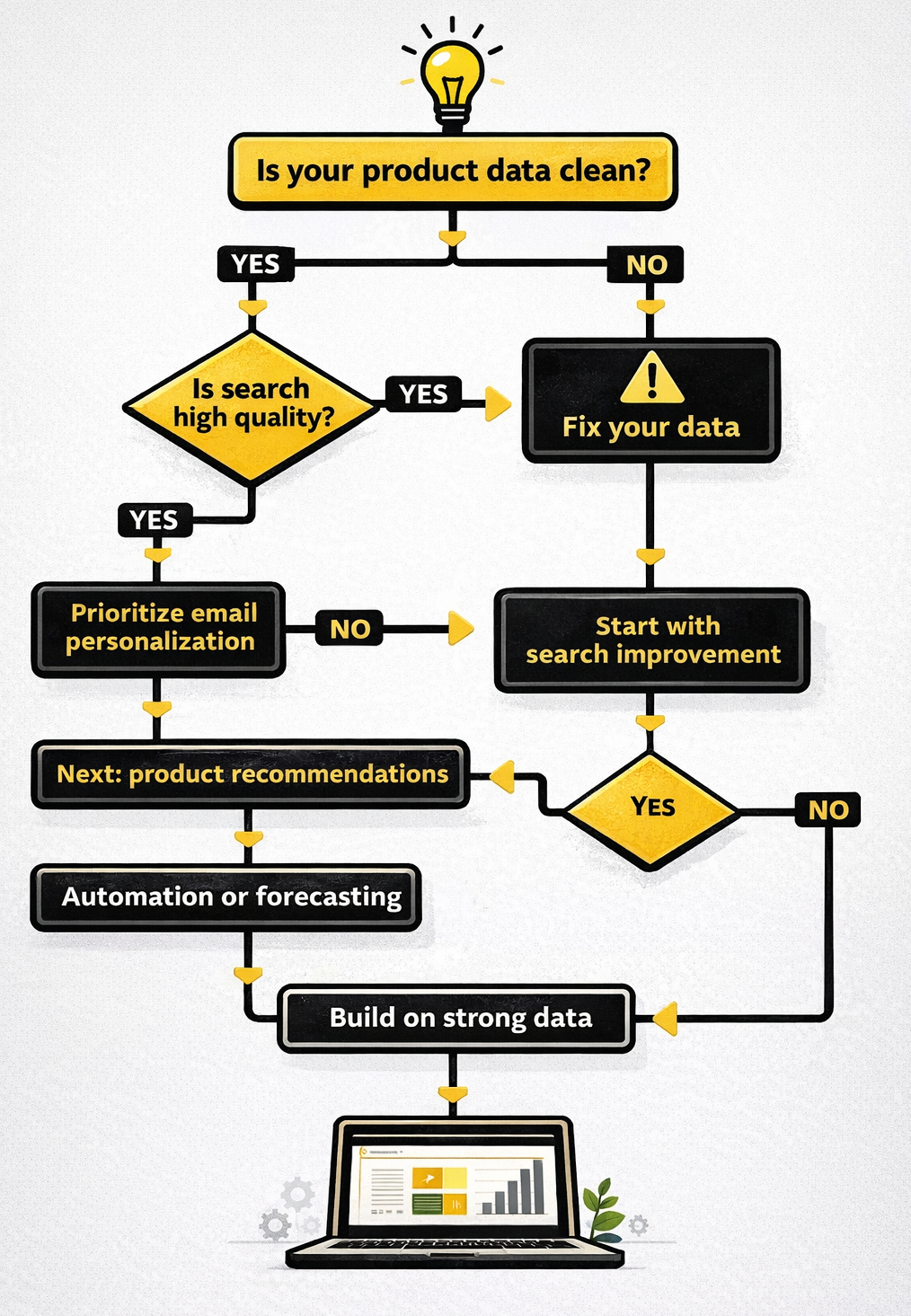
The best implementation order is usually the least glamorous one: start with the systems that improve revenue or reduce friction quickly.
Then prioritize AI search. It tends to deliver fast value because it improves outcomes for high-intent visitors.
After that, email personalization is often a strong next move. It is relatively easy to implement, and the results are easier to measure than more experimental AI features.
Recommendations come next when the catalog is deep enough and customer behavior data is strong enough to support them.
Customer support automation makes sense when ticket volume is high and a large share of incoming questions are repetitive.
Demand forecasting becomes more worthwhile once the business has enough sales history and inventory complexity to justify it.
Dynamic pricing and advertising automation usually belong later, once the feed quality, tracking, and commercial volume are strong enough to support them.
What is usually not worth prioritizing early is full AI autopilot content publishing, AI bots handling sensitive complaints without review, and experimental features like virtual try-on before the core catalog and customer journey are working properly.
The Bottom Line
AI already has real uses in e-commerce. The mistake is treating every use case as equally mature or equally urgent.
For most teams, the biggest wins still come from better search, stronger email performance, cleaner support automation, and faster content workflows. But none of that works well for long if the product data underneath is weak.
Get the catalog in shape first. Then apply AI where it solves an expensive problem, not where it makes the nicest demo.
FAQ
Do we actually need a separate AI tool?
Not always. In many stores, the first useful AI features are already built into the platform, the email tool, or the ad stack. A separate tool makes sense when the problem is important enough to justify better control or better results.
How quickly should this start paying off?
Search, email optimization, and some support workflows can show impact fairly quickly because the metrics are already visible. Forecasting, pricing, and broader personalization usually take longer and need better historical data.
What usually causes AI tools to underperform?
Usually the catalog, the feed, or the workflow logic. If outputs feel generic, inconsistent, or off-target, the first place to look is the input quality.
What is still not safe to automate too aggressively?
Anything customer-facing where trust matters: product content without review, support for edge cases, or ad automation running on incomplete feeds. These failures do not stay hidden for long.