


In this article, you’ll learn:
If you sell online, you work with two kinds of content every day: product data and digital assets. PIM (Product Information Management) keeps product data in order—SKUs, specs, prices, attributes, product descriptions. MAM (Media Asset Management) manages visual and media assets—product images, videos, audio files, design files, and brand materials, that is, the core digital content your company sells across e-commerce channels.
This guide is for e-commerce, retail, brand, and marketing teams trying to decide whether they need PIM, MAM, or both — in other words, how to approach PIM vs MAM when there are many systems, sales channels, and customer touchpoints involved.
PIM vs MAM at a Glance
Before we dive into definitions, here’s a quick PIM vs MAM comparison.
| Aspect | PIM (Product Information Management) | MAM (Media Asset Management) |
|---|---|---|
| Core focus | Structured product data | Media and digital assets |
| Main content types | SKUs, attributes, specs, prices, product descriptions, data sheets | Product images, lifestyle photos, videos, audio files, design/source files |
| Primary users | Product managers, e-commerce teams, merchandising, catalog/operations | Creative teams, marketing departments, brand teams, agencies, video teams |
| Main pain it solves | Inconsistent or incomplete product data across channels | Lost, duplicated, or outdated visuals across tools and teams |
| Typical “red flags” | Multiple “master” spreadsheets, rejected feeds, data inconsistencies | “final_final_v3” files, wrong assets in campaigns, unclear usage rights |
| Key capabilities | Central product record, enrichment, channel mapping, feed syndication | Versioning, rich previews, rights & access management, approval workflows |
| Where it sits in the stack | Between ERP/MDM and sales channels (webshop, marketplaces, retail partners) | Between creative tools and publishing channels (web, social, portals) |
| Best for | Growing catalogs, multi-channel / multi-market e-commerce | Heavy visual/media use, brand-driven campaigns, video-centric workflows |
| When it’s not enough alone | When visuals are equally critical and media is scattered everywhere | When data (specs, pricing, attributes) is messy or duplicated per channel |
| When you usually need both | Complex products and lots of visuals across many sales & marketing channels | Omnichannel brands where product data and visuals must always stay in sync |
What is PIM (Product Information Management)?
A PIM system is the central place where all structured product data lives, a product information management (PIM) solution focused on data management rather than media files. It collects product details from multiple sources, lets teams enrich and standardize that information, and then distributes it to every sales and marketing channel where you sell.
Instead of having several “almost correct” versions of a product in different systems, PIM gives you one record everyone can trust and reuse, a single source of up-to-date product details.
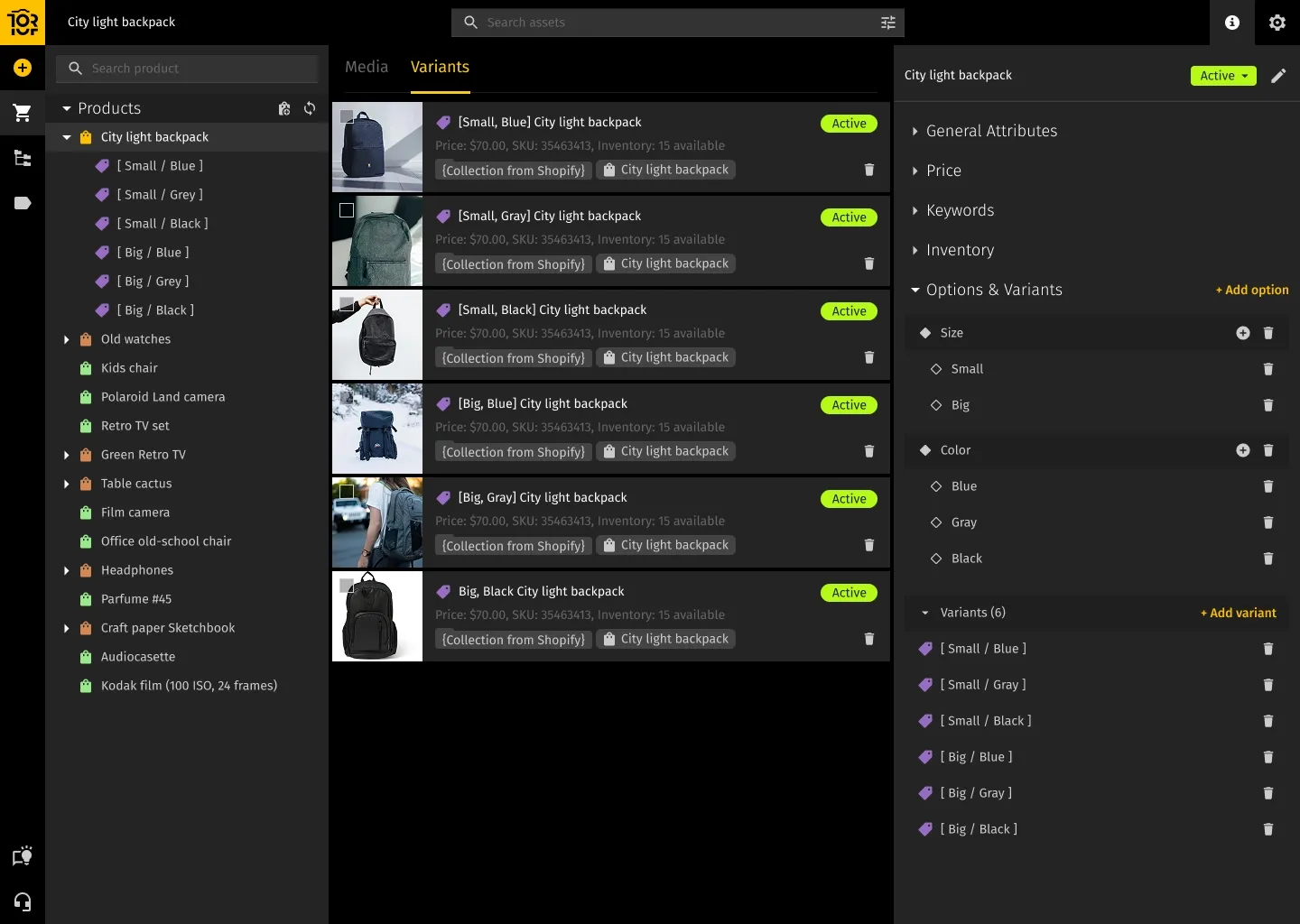
What data lives in a PIM?
In practice, PIM stores everything that describes what a product is and how it is sold: identifiers such as SKUs and codes, variant structures and product families, core product attributes and technical characteristics, pricing and availability rules, and even supporting data sheets and documentation. All of this is kept in a consistent structure instead of being scattered across spreadsheets, emails, and one-off imports, so master data from ERP, supplier data, and marketing copy are finally consolidated in one place rather than managed as separate islands.
How PIM fits into your stack
PIM sits between your “source of record” systems and your sales and marketing channels. Core numbers such as stock levels, basic product references, and supplier information usually come from ERP or an MDM system. Marketing and product teams then use PIM to enrich those records with copy, additional attributes, and links to relevant media. Once a product is complete and approved, PIM pushes a channel-ready version to your own website, marketplaces like Amazon, Shopify, retail partner feeds, and any other system that needs structured product information.
This removes the need to maintain separate “mini catalogs” inside every platform. Channels stop being data silos and start acting as views on the same underlying product information.
Why PIM becomes critical once you sell in more than one place
With a single website, it is still possible to survive on spreadsheets and manual updates. As soon as you add marketplaces, distributors, regional sites, or print catalogs, that approach breaks down. A small change — a new material, a different size range, an updated safety warning — suddenly needs to be reflected in several places. If even one channel is missed, you have conflicting information in front of the customer.
The result is predictable: rejected marketplace feeds, customer complaints, returns, support tickets, and launch delays because teams spend days reconciling product data instead of planning campaigns. PIM solves that by giving you one authoritative record for each product. You update it once, and the system takes care of pushing the correct, formatted version of that data to every connected channel.
What is MAM (Media Asset Management)?
A MAM system is built for rich media: high-resolution product and lifestyle photos, video content, audio, and creative project files from design tools. You can think of it as a specialized kind of digital asset management focused on media-heavy workflows rather than documents and simple file storage.
What makes MAM different from file storage?
General-purpose cloud storage can synchronize files and share links, but it has no understanding of media production. A MAM system adds that missing layer. It lets teams preview large images and videos in the browser, scrub through timelines, view audio waveforms, and inspect technical metadata without opening heavy desktop apps.
It keeps full version history so you can see which edit is the latest and who changed what. It can generate web-ready renditions, thumbnails, and platform-specific exports automatically, instead of designers exporting every version by hand.
On top of that, MAM tracks license terms and expiry dates for stock photos, footage, and music. It supports review and approval workflows, so teams know which files are still in progress and which are approved for use. Search is driven by metadata and often by the content itself, so you can find assets by product, campaign, region, people featured, or even spoken words in a video when transcripts are indexed.
Beyond simple storage
Storing media is easy; using it correctly at scale is hard. Shared drives quickly fill up with nested folders, duplicates, outdated assets, and filenames that mean nothing to anyone who did not create them. MAM replaces that with a structured library where each asset has context: what it is, where it can be used, who owns it, which products it belongs to, and which markets it is cleared for.
The system “understands” that one master video will lead to multiple versions for web, social, and different regions, and that these versions are all related. It knows which shot was finally approved, which logo file is current, and which packaging render replaced an earlier design. That context is what lets creative and marketing teams move faster without increasing risk.
Who relies on MAM day to day
MAM is most common in teams whose work revolves around media: in-house creative teams, marketing and brand teams, agencies, and video and content production groups. They use it to store work-in-progress files, coordinate edits, share material with stakeholders, and publish approved assets to channels and partners. For organizations with a lot of images, video, or audio, MAM turns a loose pile of drives, links, and email attachments into one coherent, searchable library.
Who Typically Uses PIM (and When It’s Time to Consider One)
PIM usually enters the picture when managing product data with spreadsheets and manual updates stops being sustainable. This happens when the catalog grows, channels multiply, and different teams start maintaining their own “master lists” that never quite match.
You see PIM most often in e-commerce brands selling on their own sites plus major marketplaces, in manufacturers whose products require detailed technical specs and compliance information, and in retailers and distributors who need to standardize data from many suppliers before publishing it.
In these environments, people recognize the pattern: hundreds or thousands of SKUs, frequent data conflicts between different files and systems, marketplace rejections because attributes are missing or formatted incorrectly, and launches that slip because teams spend too much time fixing data.
At that point, it is no longer just an Excel problem. It is a structural product data problem, and a PIM system is usually the most efficient way to solve it.
Who Typically Uses MAM (and How You Know You Need One)
MAM tends to show up where the working day is dominated by media files: marketing, brand, in-house creative, agencies, and video teams. The main question there is not “Is the voltage value correct?” but “Where is the latest version of this visual and are we allowed to use it in this context?”
The symptoms are familiar. Shared drives and cloud folders carry names like “final_assets_NEW” or “latest_latest”, yet nobody is completely sure which visual is truly approved. Campaigns go live with outdated images because they were simply the easiest to find. Stock content or licensed music is used outside of its allowed period or region because there is no single place that tracks usage rights. Regional offices, resellers, and agencies repeatedly ask where they can download the current brand assets.
When creative work is routinely slowed down by hunting for files, checking versions, and re-sending the same assets rather than actually creating new material, it is a strong sign that you have outgrown simple file storage and need a MAM system.
When You Need PIM, MAM, or Both
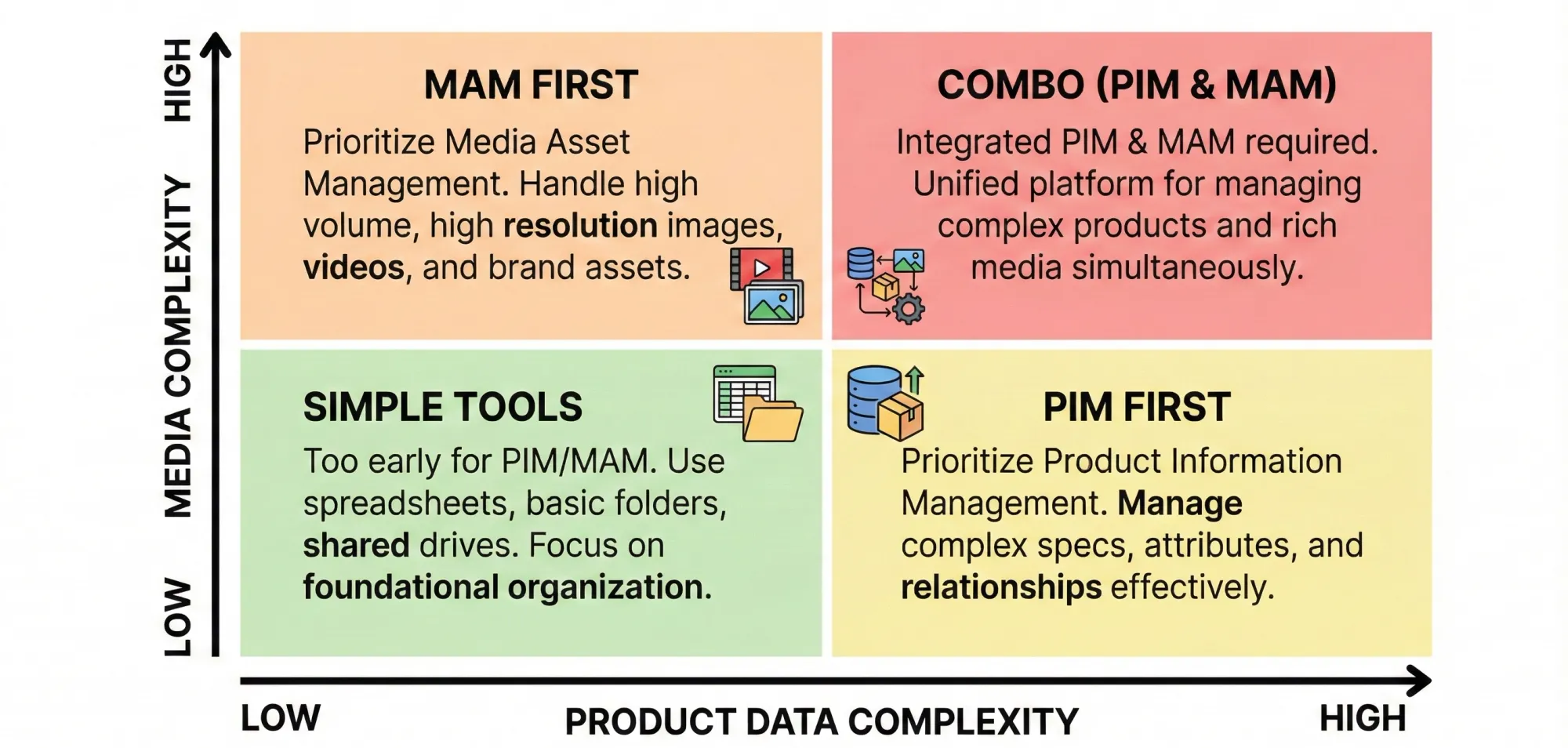
Some teams clearly have a product data problem: their biggest pain is keeping product information consistent and complete across channels. Others clearly have a media problem: their main bottleneck is finding, approving, and distributing visuals. Many growing brands, though, end up with both at the same time.
You mostly need PIM when your main risks and delays come from incorrect, incomplete, or misaligned product data. Maybe a spec is different between your site and a marketplace, or pricing and availability are out of sync across regions. In those cases, your first priority is to bring product information under control.
You mostly need MAM when the biggest friction is around assets rather than numbers: the wrong hero image, missing lifestyle shots, no clear place to get the latest logo, and teams sending large files around in ad-hoc ways. Then it makes more sense to solve media management first.
You likely need both when you run a serious omnichannel operation with complex catalogs and a lot of visual content. That is common in categories like fashion, electronics, home and living, or beauty, where each product may have many variants, regional rules, and a large set of supporting images and videos. Product pages and listings in these segments depend on accurate data and strong media working together. If PIM and MAM sit in separate worlds with no real connection, mismatches between data and visuals are almost guaranteed.
Why PIM and MAM Work Better Together
Customers never interact with data and media separately. They see a product detail page, a search result, a marketplace listing, a campaign landing page. Every one of those combines structured information—name, price, specs, availability—with images, video, and other creative content.
In a modern stack, PIM is usually responsible for the structured side: SKUs, relationships between products and variants, attributes, pricing, and so on. MAM holds the visual side: product photography, lifestyle imagery, packshots, explainer videos, and related media. The real power comes when these two systems are connected so that each product knows which assets belong to it, and each asset knows which products and channels it supports.
Then workflows change. When a new color variant is added in PIM, it is clear which media needs to be produced or updated. When a packaging image is changed in MAM, that change can flow automatically into product pages, marketplace listings, and marketing templates instead of relying on someone to remember every place where the old asset was used. Without this connection, it is easy to end up with the right data and the wrong visuals, or the other way around.
Example: Launching a New Product Line
Imagine launching 50 products, each with 3 color variants: one 150 SKUs in total. Without an integrated approach, product managers enter all specifications into a PIM or spreadsheets while creative teams upload images and videos into shared folders or a separate media system.
Someone then has to sit down for each channel and manually pair products with the right visuals. Any later change — a new price, updated packaging, an extra market — means going back through the same manual matching process.
With PIM and MAM connected, the flow looks different. The product team defines the catalog structure and attributes in PIM. The creative team uploads media to MAM and tags assets with SKUs or product identifiers. The systems use those connections to combine data and media automatically when generating product pages and feeds. Adding a channel, adjusting pricing, or replacing a set of images becomes a controlled, repeatable process rather than a series of one-off fixes.
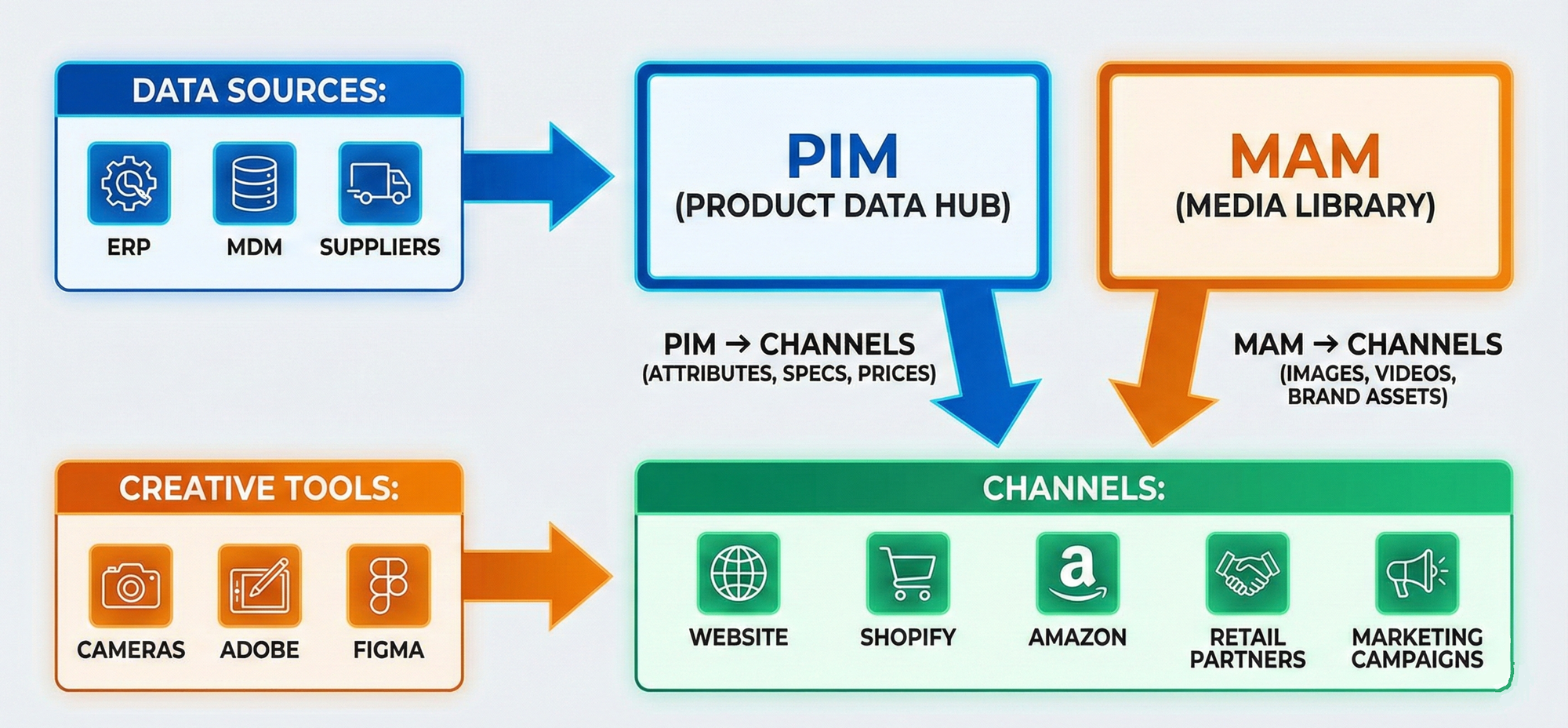
The outcome is shorter time-to-market, fewer errors, and less risk of inconsistent product presentations across channels.
Implementation Tips: Where to Start
When introducing PIM, the most useful first step is to map what you already have. List the key attributes you track today, where they live, and which channels depend on them. Very often you will discover multiple versions of the same data in different places. From there, a sensible approach is to start with one product line or brand and bring that slice into PIM.
Clean and structure it properly, then connect it to one or two important channels. Use this pilot to refine your workflow for creating, reviewing, and publishing changes before scaling it to the rest of the catalog.
When introducing MAM, start by tracing where your assets are now and which ones matter most. Identify core asset types—current product imagery, active campaign materials, brand guidelines—and migrate those first into a simple, well-thought-out structure with basic metadata such as product, campaign, region, and usage rights. Set access rules so internal teams and partners see what they need, and spend time teaching people how to search and tag assets in a consistent way. The library will only stay useful if everyone uses it in roughly the same way.
FAQ
Is MAM the same as DAM?
No. Digital Asset Management (DAM) is a broader category for managing many kinds of digital files, including documents and presentations. Media Asset Management (MAM) focuses specifically on rich media such as images, video, and audio, with deeper support for previewing, versioning, transforming, and approving that content.
Can a PIM system replace a MAM?
It can’t. PIM can reference media files and store basic metadata, but it is not built for heavy media workflows. It does not handle large previews, format conversions, detailed rights information, or creative review in the way a MAM system does.
Do small teams really need PIM or MAM?
Not necessarily at the beginning. But team size is less important than the amount of data and media you manage. If one or two people already spend a big part of their week fixing product information across systems, or if creative people spend more time searching for assets than producing new work, the underlying problems are the same as in larger organizations and dedicated systems start to make sense.
Which should come first: PIM or MAM?
It depends on where the pain is stronger. If data errors, rejected feeds, and inconsistent specs are blocking growth, PIM should come first. If brand inconsistency, missing assets, and slow campaign delivery are your main issues, MAM is the better starting point. Many teams eventually use both, but there is no single order that fits everyone.
Conclusion
PIM and MAM sit side by side in many architecture diagrams, but they deal with different parts of your reality. PIM structures what you sell—names, attributes, prices, relationships, and localized content across channels. MAM structures how those products and your brand appear—images, video, and other media that shape the customer’s perception.
Fixing only one side leaves friction on the other. Clean product data paired with weak or outdated visuals still confuses customers; beautiful media on top of wrong specs or pricing still leads to disappointment and returns. When PIM and MAM work together, product launches are more predictable, updates are easier to roll out, and your digital shelf stays consistent wherever customers interact with you.
Enjoyed this article? Try Toriut's free beta — or book a demo, and we’ll gladly walk you through everything and answer all your questions.
Author

Maks Petrenko is an Operations Manager (PhD in Management) focused on workflow optimization, performance tracking, and data-driven improvement. He has led cross-functional teams of 20+ people and rolled out KPIs across Support, Marketing, R&D, and Sales, cutting returns from 26% to 10%, increasing activation from 8% to 13%, and quadrupling MQLs in six months.


