


In this article, you’ll learn:
Your e-commerce business just hit 5,000 SKUs. Your design team is drowning in 50,000 image files. And nobody can find anything.
This is the moment when brands start Googling "PIM vs DAM"—usually at 11 PM, after spending three hours hunting for the correct product photo for tomorrow's email campaign.
So you start researching solutions and immediately hit confusion: PIM (Product Information Management) and DAM (Digital Asset Management) both claim to solve your problems. Both manage product data and digital assets in some way, both promise better content management across sales and marketing channels, and pricing pages don’t always make the key differences clear.
PIM and DAM solve different problems, serve different teams, and excel at different tasks—but for modern e-commerce brands, they work best together.
PIM vs DAM at a Glance
If you just need a quick answer before diving into the details, start with this table.
| Topic | PIM (Product Information Management) | DAM (Digital Asset Management) |
|---|---|---|
| What is it? | A central hub for structured product data: titles, attributes, SKUs, prices, stock, locales, etc. | A central hub for digital assets: images, videos, design files, PDFs, brand kits, and more. |
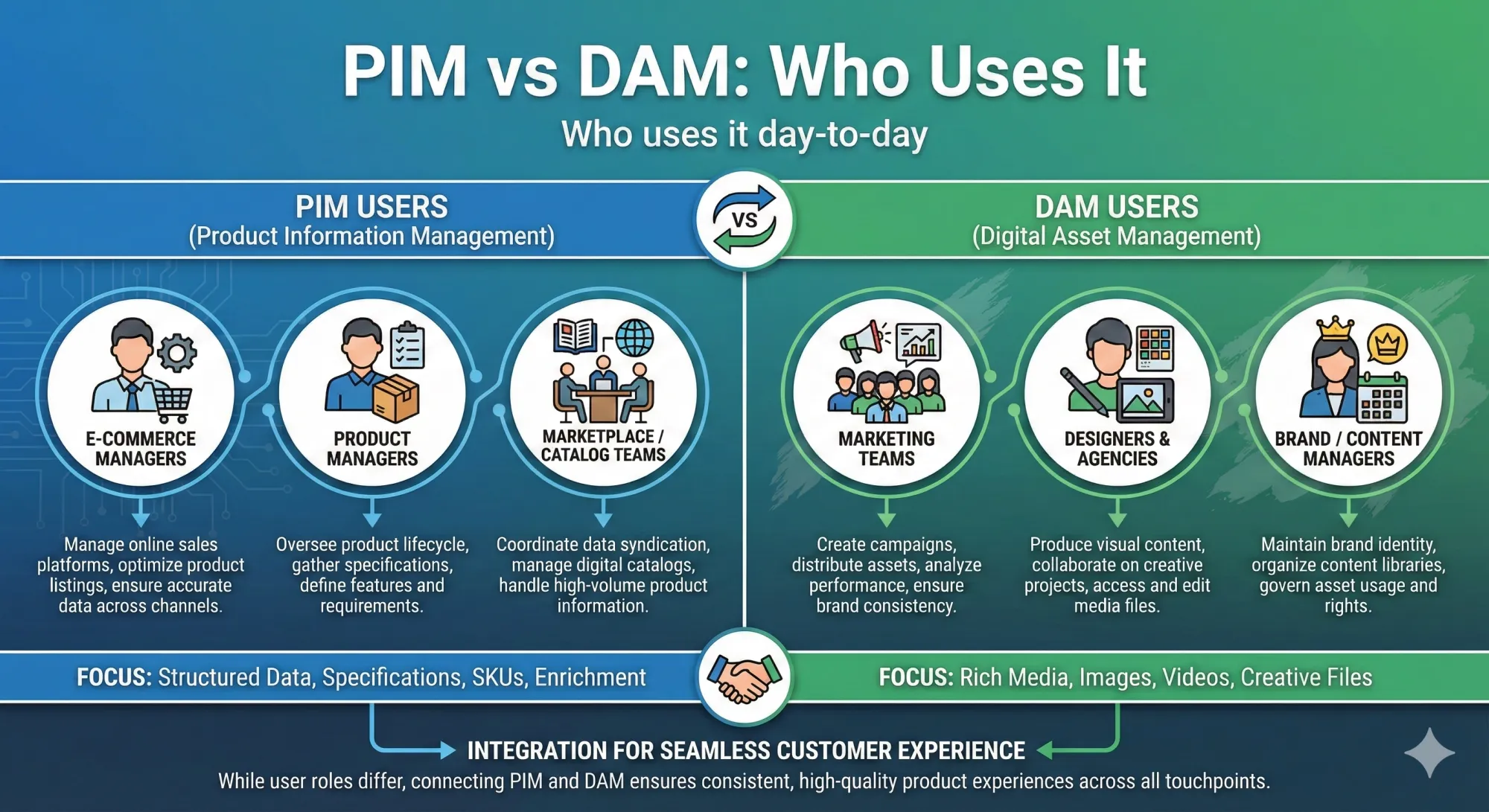
| Who uses it? | E-commerce managers, product managers, merchandisers, marketplace/content teams. | Marketing teams, brand managers, designers, agencies, sales and communications teams. |
| What problem does it solve? | Keeps product information consistent and accurate across all sales channels, markets, and languages. | Keeps brand and content assets organized and findable, so everyone uses the right, approved file. |
| When to choose it? | When you sell many SKUs across multiple channels and struggle with messy, duplicated, or outdated product data. | When you have lots of media, version chaos, and teams waste time searching for or recreating assets. |
What Is a Product Information Management (PIM) System?
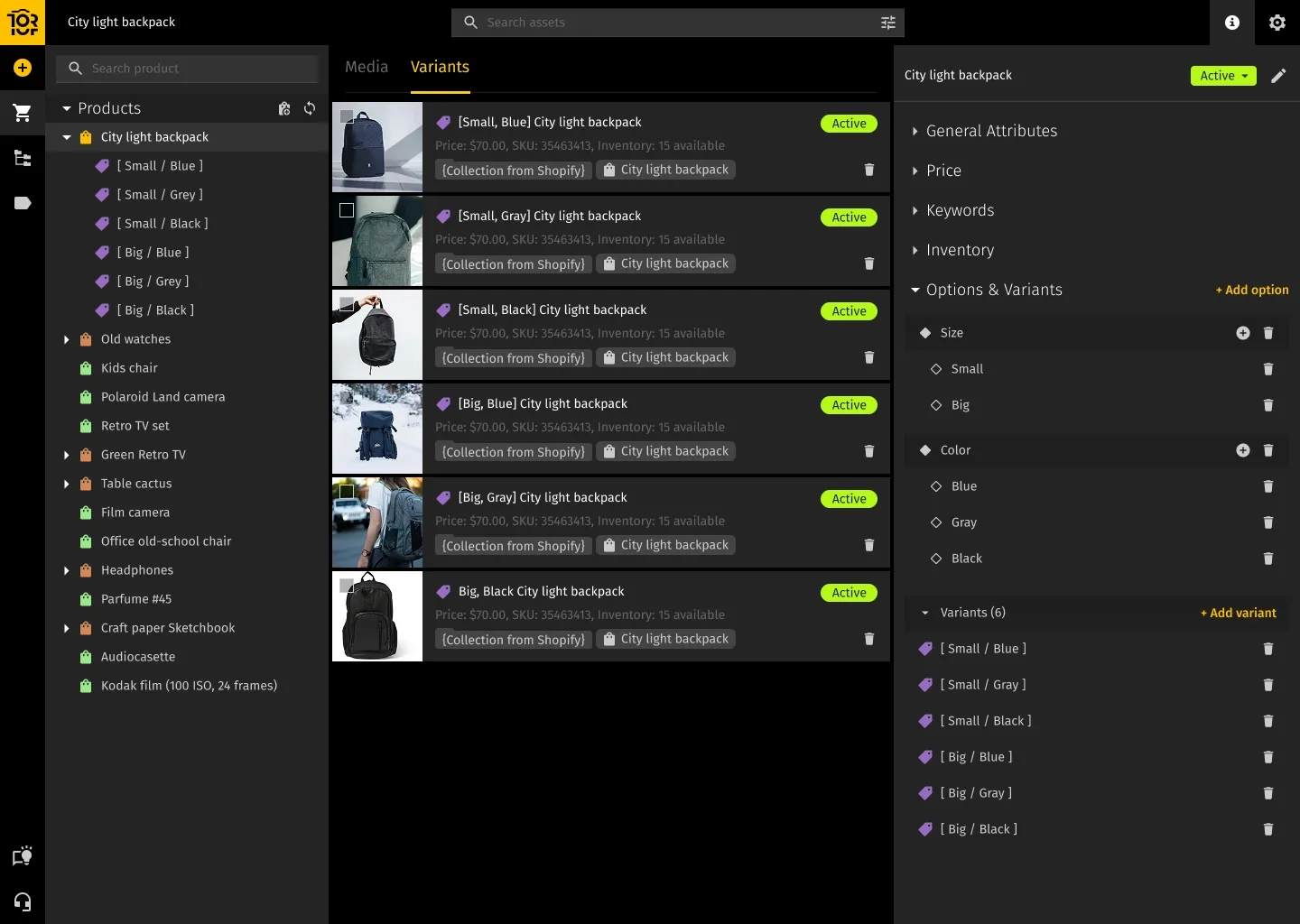
A Product Information Management (PIM) system is a centralized platform where all your structured product data lives. It keeps together everything that describes your products: names, SKUs, attributes, prices, technical specifications, categories, and the relationships between variants. In other words, PIM systems handle the core product data management your business needs to keep product listings and product catalogs consistent across e-commerce platforms and online retailers.
Instead of juggling spreadsheets and half-configured ERP fields, PIM gives you one place to manage complex product data for every channel you sell through. ERPs and other enterprise resource planning tools are great at transactions and inventory, but they were never designed to handle rich product information, channel-specific attributes, and clean data governance. PIM software and modern PIM platforms fill that gap.
For Shopify and e-commerce brands, a PIM like Toriut becomes the “catalog brain”: it keeps product data consistent, while your store, marketplaces, and other tools simply read from it.
Who uses PIM day-to-day?
PIM is not a “single-team” tool. Different roles touch it in different ways:
- Product managers create and maintain products, define attributes, and control how the catalog is structured.
- E-commerce managers enrich product pages, prepare content for campaigns, and sync the catalog to online stores and marketplaces.
- Merchandisers group products into assortments and collections, coordinate launches, and work with pricing and promotions.
- Content and marketing teams write and localize product descriptions, manage SEO fields, and keep messaging consistent.
- Operations teams watch over inventory-related fields and product lifecycle states (draft, active, discontinued).
- IT and integration specialists connect the PIM to the rest of the stack — e-commerce platforms, marketplaces, ERP, DAM, and analytics.
In practice, PIM becomes the place where all these teams — and even some external partners — meet around a shared version of product truth, supporting the entire product lifecycle and everyday business operations.
Key PIM features
Modern PIM platforms have a similar core set of capabilities:
- Central product data hub that collects and standardizes information from ERPs, spreadsheets, supplier feeds, and other sources.
- Channel-specific catalogs and templates so each channel gets product data in the structure and format it expects.
- Bulk editing and validation rules that let you update thousands of SKUs at once and automatically flag incomplete or incorrect data.
- Localization and multi-store support to manage translations, local measurements, and region-specific content from one interface.
- Syndication tools to publish product data to online stores, marketplaces, and partner channels without manually rebuilding feeds.
- Workflow and approval management so changes pass through the right people before they reach customers.
- Data quality scoring and completeness tracking to show which products are ready to go live and which still need work.
If you’re using a PIM like Toriut on top of Shopify, you get all of this without replacing your existing store — the PIM simply feeds it better, cleaner product data.
PIM benefits for e-commerce and retail
When PIM is implemented properly, the impact is easy to see:
- Faster time-to-market. New SKUs and updates go live across channels much faster because you’re not manually copying data into each system.
- Fewer listing errors and rejections. Validation rules catch missing attributes, broken IDs, or wrong formats before marketplaces do.
- Consistent, up-to-date product details everywhere. You update product specifications and descriptions once in your PIM central repository and sync them out, instead of repeating manual processes in every sales channel. This improves data consistency and removes a lot of operational friction.
- Lower return rates. Clear specs, sizing, and realistic descriptions reduce “not as described” returns and disappointed customers.
- Better collaboration. Teams work in one shared system instead of trading spreadsheets and conflicting versions by email.
- Scalability. A well-structured PIM handles growth from a few hundred SKUs to tens of thousands without collapsing into chaos.
- Clear, accurate product data and consistent product listings across channels improve the customer experience and reduce “not as described” returns.
What Is a Digital Asset Management (DAM) System?
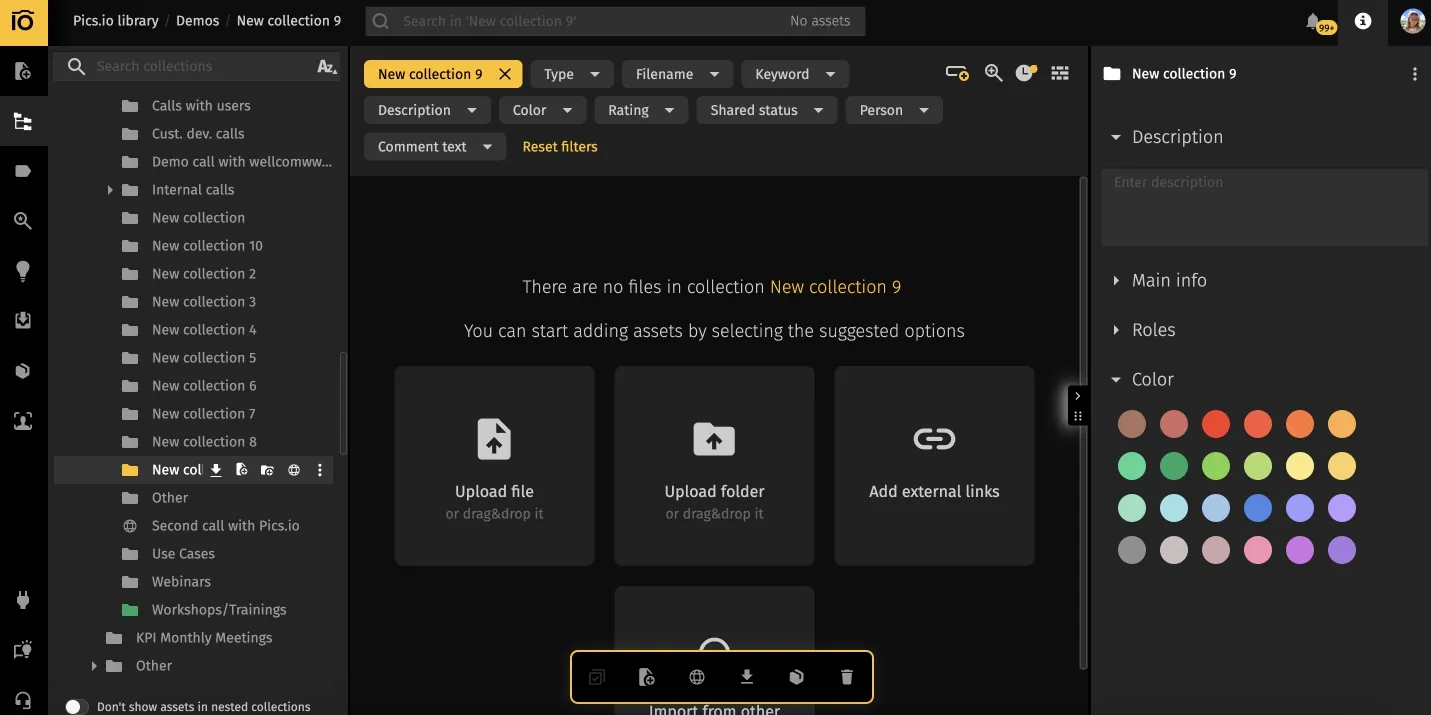
A Digital Asset Management (DAM) system is a centralized platform for your digital files and creative assets: images, videos, documents, design files, brand materials, and more. A modern digital asset management (DAM) solution turns a messy mix of shared drives, Dropbox links, and email attachments into a structured, searchable library where you actually manage digital assets instead of hunting for them.
Compared to simple storage tools like Google Drive, a DAM adds metadata, permissions, version control, and workflows. The result is straightforward: the right people can find the right asset, in the right format, when they actually need it.
What counts as a digital asset?
DAM systems handle unstructured content — media and creative material in many different formats, for example:
- Product photography (hero shots, details, lifestyle images)
- Marketing graphics, ad creatives, and social media visuals
- Videos such as product demos, tutorials, interviews, and campaigns
- Design source files from Adobe Creative Cloud, Figma, Sketch, etc.
- Documents: product catalogs, presentations, sell sheets, whitepapers
- Brand assets: logos, icons, templates, fonts, color palettes, guidelines
- 3D models and AR/VR assets for more advanced product experiences
Anything your teams use to present and explain the product visually or in rich media usually belongs in DAM, not in a random folder on someone’s laptop.
Who uses DAM day-to-day?
A DAM typically sits closest to marketing and creative teams, but it touches many roles:
- Marketing teams pull on-brand visuals for campaigns, landing pages, and ads.
- Brand managers control which assets are approved and track where they’re used.
- Designers and creative teams store work-in-progress and final files with version history.
- Agencies and external partners upload deliverables and access brand kits without “send me the logo again” threads.
- Sales teams grab the latest decks, one-pagers, and case studies instead of reusing old files.
- Content creators (photographers, videographers, copywriters) deliver and organize their work in one place.
- IT and admins manage access, security, and integrations so the DAM stays reliable.
Key DAM features
Most mature DAM solutions provide a similar set of building blocks:
- Centralized asset library where all images, videos, documents, and design files live, with consistent metadata.
- Metadata, tagging, and AI-powered search so teams can find assets by keyword, tag, campaign, product, or even visual similarity.
- Version control and approval workflows that track changes over time and ensure only approved versions are used.
- Brand portals and secure sharing with password-protected links, expiry dates, and usage rules for partners and clients.
- CDN integration and optimized delivery for fast, reliable loading of images and videos on your site or in campaigns.
- Integrations with design, CMS, and marketing tools so assets are available directly inside Adobe Creative Cloud, Figma, CMSs, and automation platforms.
- Rights management and compliance tracking to avoid using unlicensed or expired assets by accident.
DAM benefits for marketing and content teams
For content and marketing teams, the gains are very practical:
- Stronger brand consistency. Everyone pulls approved visuals from one place instead of saving their own versions.
- Less time lost searching. Teams type a few keywords or filter by campaign and find what they need in seconds.
- Fewer mistakes and outdated assets. Version control and approvals reduce the risk of shipping old logos or wrong images.
- Better reuse of existing content. Good assets are easy to discover and repurpose instead of being forgotten in archive folders.
- Controlled access and security. Role-based permissions and audit trails keep sensitive or licensed content under control.
- Room to grow. As the volume of content and number of collaborators grows, the library stays structured and usable.
PIM vs DAM: Key Differences
Focus: product data vs. brand assets
PIM is focused on what you sell. It keeps catalog structure, attributes, pricing, relationships, and channel rules under control. The outputs are product listings, feeds, and data exports that power your online store, marketplaces, and partner catalogs.
DAM is focused on how you present what you sell. It manages photos, videos, graphics, and documents that carry your brand and product story. The outputs are campaigns, visuals, and content experiences that customers actually see.
Data model: structured vs. unstructured content
PIM is built on a rigid, structured data model. Each product follows a defined set of attributes and data types, and relationships between products are explicit. This rigidity is what enables automation, validation, and reliable feeds.
DAM is built around files. A media asset is a file with metadata attached. That metadata can be rich, but the underlying content is still unstructured. DAM gives you flexible taxonomies and tags, but it doesn’t behave like a relational product database — and it doesn’t need to.
Your Path Forward
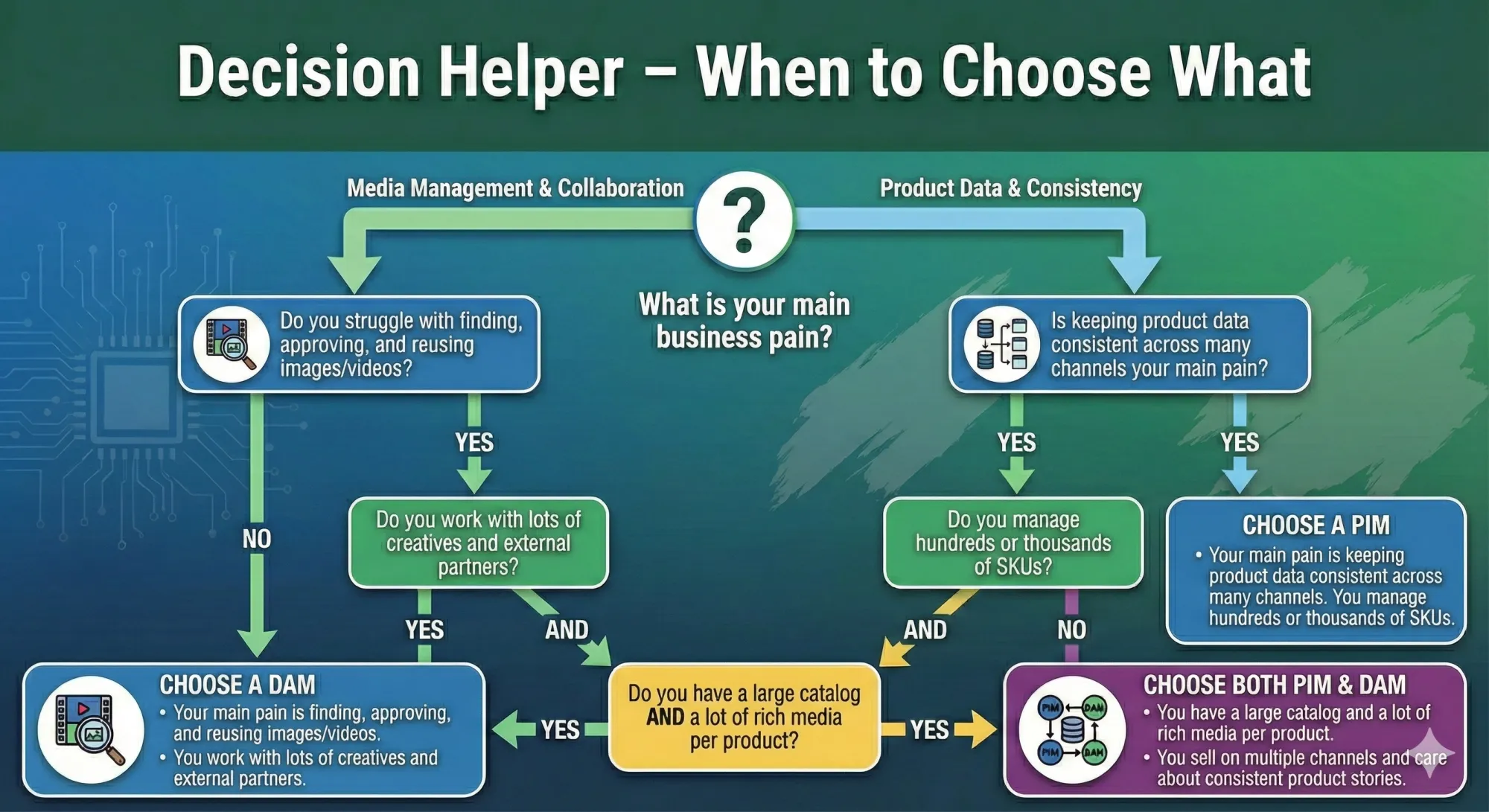
Start with DAM if:
Your product catalog is still manageable, but your media library is chaotic. The creative team spends more time searching for assets than creating campaigns. Brand consistency is slipping, and different teams keep using different versions of the same file.
Start with PIM if:
You’re overwhelmed by SKUs, variants, and channels. Updating products eats days of work. Errors in product data are showing up in customer support tickets, returns, or marketplace rejections. The media library is not perfect, but it’s not the main bottleneck.
Plan for both if:
You sell complex products and rely heavily on rich media. You’re building or rebuilding e-commerce with a long-term view. You operate in categories like fashion, electronics, or home goods, where both product attributes and visuals matter a lot. You know that spreadsheets and shared drives won’t survive the next stage of growth.
If you already use a DAM and feel the product-data pain, adding a focused PIM such as Toriut on top of your existing stack is often the cleanest next step.
Critical: If you go for both PIM and DAM, think about integration from day one — whether that’s a unified platform or separate tools with solid APIs and a clear data model.
The Reality Nobody Mentions
Successful teams rarely start with a perfect, all-in-one setup. They pick the biggest source of friction, solve it properly, then move to the next one.
A single well-implemented PIM or DAM that your team actually uses is worth more than two “strategic” systems that don’t talk to each other. Start where the pain is sharpest, prove the value, and then expand your stack when the next real need appears.
FAQ
Can a DAM replace a PIM?
No. DAM manages media files, but it can’t handle structured product data, variant relationships, pricing logic, or multi-channel syndication. Those are exactly the things PIM is designed for.
Can a PIM replace a DAM?
Not really. Some PIMs can store image references or simple media fields, but they don’t offer what creative teams expect from a DAM: version control for assets, visual search, deep integrations with design tools, rights management, or approval workflows for creative content.
Is PIM part of an MDM system?
It depends on the company. Master Data Management (MDM) covers core data for the whole organization; PIM focuses specifically on product information. In large enterprises, PIM may sit under an MDM program. In many e-commerce businesses, PIM runs as a standalone system that feeds stores, marketplaces, and other tools.
Do small businesses really need PIM or DAM?
Not on day one. But once you’re spending serious time on manual updates, fixing inconsistent listings, or hunting for assets across folders and chats, you’ve effectively outgrown basic tools. At that point, a lightweight PIM, a focused DAM, or both can save more time than they cost.
How long does it take to implement PIM or DAM?
A straightforward DAM implementation can often be done in a few weeks: you define structure, migrate assets, set permissions, and connect core tools. PIM usually takes longer because it touches pricing, catalog structure, and integrations — expect several months, especially if your existing data needs cleanup. The messier the starting point, the more of the project is really about data, not software.
Does Shopify already include PIM features?
Shopify does basic product management well for a single storefront, but it’s not a full PIM. It doesn’t cover advanced data modeling, multi-channel syndication, strict validation rules, or complex workflows. If your Shopify catalog starts to feel like a bottleneck, adding a PIM layer such as Toriut on top can give you proper product governance without rebuilding your store.
How to Move Forward Without Over-Engineering Your Stack
If your main pain is finding, approving, and reusing media, start with DAM. Bring order to your asset library, give teams a single trusted place for visuals, and cut the time spent searching and re-creating files. Once that’s stable, you can decide whether product data needs the same treatment.
If your main pain is keeping product data consistent across channels, start with PIM. Fix the source of truth for your catalog, stop copy-pasting between spreadsheets and platforms, and let channels read from a clean, validated product database. For Shopify and similar setups, this often means adding a dedicated PIM like Toriut behind your existing store.
If both sides hurt — product data and media — plan for PIM and DAM together, but don’t try to “boil the ocean” at once. Prioritize the system that removes the biggest current bottleneck, then design a clear integration so products and assets can be linked by IDs or SKUs instead of manual work.
The goal isn’t to have the most impressive diagram of your tech stack. The goal is to remove the specific friction that’s costing you time, revenue, and focus right now. Start with the real problem, implement one system well, prove the value, and then expand when the next clear need appears. A simple stack that your team actually uses will always outperform a complex one that exists only in slides.
Enjoyed this article? Try Toriut's free beta — or book a demo, and we’ll gladly walk you through everything and answer all your questions.

Eugene is a PIM Toriut product manager specializing in catalog architecture, metadata governance, and feed optimization. Drawing on experience in sales, logistics, and analytics, he turns customer workflows into scalable product-data processes across regions, SKUs, and channels.


